Category: Technology

Huawei MediaPad Review

Huawei MediaPad

Huawei is known to be one of the world’s largest network manufacturers.  In fact, our very own Sun Cellular chose Huawei to be their telecom provider when they expanded last 2005.

I, myself, bought a Huawei Wireless Modem before and had used it intensively for quite a long time until I lost it unfortunately on a trip to Palawan.

This time around, Huawei has jumped on the tablet bandwagon with the Huawei MediaPad.  I guess they see the need to penetrate the market and establish their dominance in the 7-inch tablet category.

In all honesty, I never thought I’d be able to get my hands on a MediaPad.  But since there’s one in front of me right now, I guess it was meant to be.  I must admit that this was the first tablet that I experienced thoroughly so you can imagine my excitement when I got a chance to unbox this newly released Huawei tablet.

Unboxing
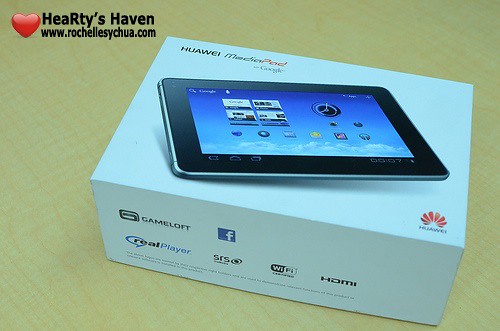
huawei mediapad box

After I picked up my Huawei MediaPad unit, I immediately laid it down on the table.  I removed the lid and viola, there it was in a shiny, shimmery, splendid kind of way hehehe 😛  I stared at it for a good 10 seconds before I took it out of the box…  Good thing there was a plastic liner protecting the Huawei MediaPad or else, in less than a minute, it would had my fingerprints all over it.
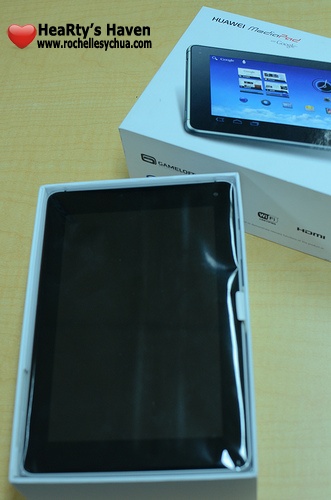
huawei mediapad box opened

Other contents included an AC charger, USB cable and a quick start guide.  I loved how they packaged the gadget.  As you can see, people like us get enjoyment even with just opening the box.  Yes, we’re geeky that way.

huawei mediaPad box contents

Specifications

  • Android Honeycomb 3.2 Operating System
  • 1.2 GHz Dual Core CPU
  • 7” LCD WXGA (1280×800 IPS)
  • 5 Mega-pixels AF camera & 1.3 Mega-pixels front-facing camera
  • 5.8GB internal storage
  • up to 32GB micro SD capacity
  • WiFi 802.11b / 802.11g / 802.11n
  • Bluetooth 2.1
  • 3.5mm stereo audio jack, Stereo speaker
  • Locations: GPS/A-GPS
  • Sensors: Accelerometer, Ambient light & compass
  • 4100 mAh battery

Look and Feel

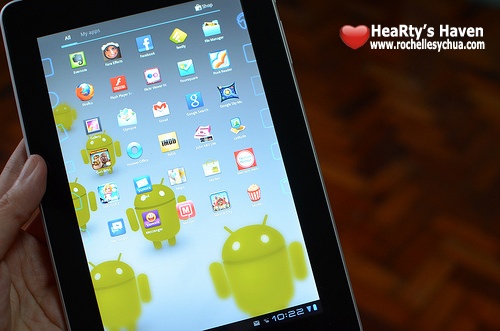
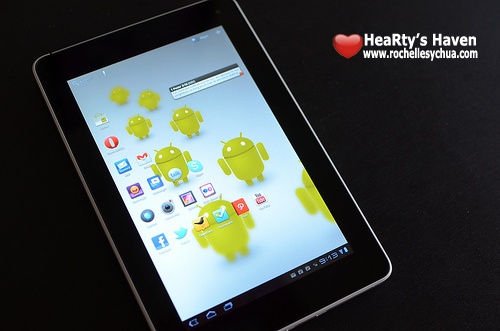
huawei mediapad app screen

I love the way Huawei MediaPad looks.  It is light, slim and compact.  The 7-inch size is perfect for everyone on the go.

The MediaPad weighs 390 grams and is 10.5 mm thick.  The aluminum unibody makes the gadget feels so solid and strong which I am particularly stoked about as I sometime worry about breaking things.

huawei mediapad thinness

At the back were two rubberized plastic inserts that houses the camera, micro-HDMI, micro-USB slots as well as the power socket.  The inserts also serves as a good feature whenever we use the Huawei MediaPad for long periods of time.   It does not cause your hands to cramp up.

huawei mediapad back

huawei mediapad hdmi usd power

The power and volume dial buttons are located on the upper right side which are also made of aluminum that matches the over all look of the tablet.  On top is the 3.5mm headphone jack as well as 2 speakers on each side.
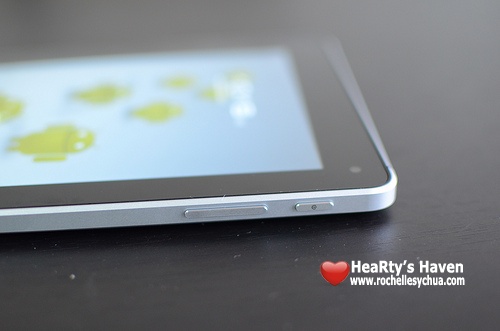
huawei mediapad buttons

The high definition screen makes it a really good viewing device.  7-inches is not as big as most tablets but I think its size is just right especially with a 217 PPI count.  What else can we ask for?

One of the unique traits of Huawei MediaPad is its 1280×800 screen resolution considering the resolution is more commonly present in 10-inch tablets.  The resolution makes it full HD 720p capable.

The SIM card and MicroSD slots are hidden behind a plastic panel on the back of the Huawei MediaPad.
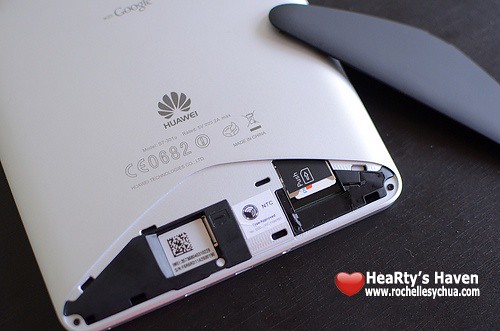
huawei mediapad micro slots

Android Honeycomb 3.2 Operating System
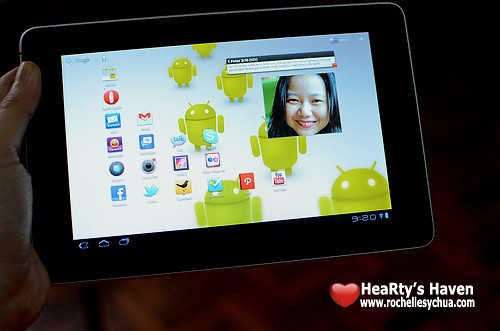
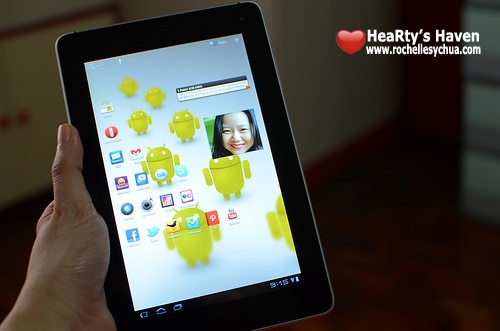
huawei mediapad 3

The Huawei MediaPad was the first tablet to carry the Android Honeycomb 3.2 OS (although some say that Acer Aconia beat them to it). Now, other Android tablets have it as well. However, there’s still something about being first that any manufacturer can be proud of.  A lot of people might be wondering why Huawei decided to go with Honeycomb 3.2 considering Ice Cream Sandwich is expected to released soon.  Personally, I think it’s because the Huawei MediaPad was designed and created several months back when the new OS wasn’t available yet for the public to download.  Anyhow, MediaPad users will be getting an update to Ice Cream Sandwich so what is there to worry about?
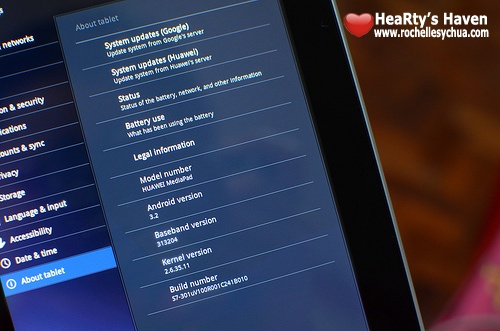
huawei honeycomb

As it turned out, the timing was just right.  Previous Android operating systems weren’t suitable for tablets considering the expanded touchscreens.  The refreshed UI and functionality of Android Honeycomb 3.2 that can be found in the MediaPad are, therefore, very welcome developments for tablet owners.

Huawei Office
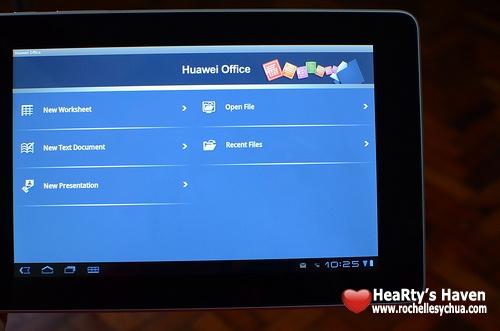
huawei office

While we have the usual Android applications pre-installed on the device, for Huawei tablet owners, there’s Huawei Office.

Huawei Office allows you to create text documents, spreadsheets and presentations.  In addition, it supports Microsoft Word, Excel, and PDF formats.

Media

  • Music

The music application is pretty straightforward.  Once you first open the application, you’ll be asked if you want to connect your Google account.  If you’ve subscribed to Google Music Beta, your music will automatically come out of the application.
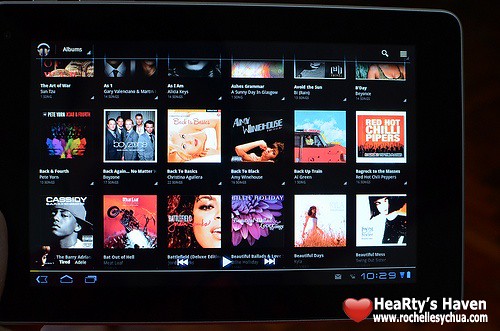
huawei mediapad music

New and recent songs are displayed by default (other views include albums, artists, songs, playlists and genres).  You have the option to shuffle, repeat all songs and repeat one songs while on play.  It’s very simple and it works!

  • Videos
Similar to the Music application, the video player is pretty simple.  Once opened, you’ll be able to see the list of videos saved on the device.  You just click on the video and it’ll play.  Controls are as easy as one-two-three.  There is a slider that shows the length and play position of the video, and on top of that, a pause button.
You can switch between portrait and landscape mode depending on your viewing preference.  With an HD resolution screen of 1280×800, you won’t go wrong with this one.
  • Camera & Camcorder

Huawei MediaPad can take still photos and 720p videos with its 5 Mega-pixel main AF camera & forward-facing 1.3 Mega-pixel shooter.

Consistent with the other stock applications, the camera was pretty simple to use.  Features for camera includes white balance and color effect.  I always stick with auto though.

I’ve taken some test shots with the MediaPad which turned out okay.  The camera is not a replacement for a real digicam, but it takes pictures good enough for sharing in social networking sites.


huawei test picture 3

huawei test picture 2

huawei test picture

The camcorder on the other hand has additional features like video quality and time lapse.  I’m wondering though why it can’t take 1080p video considering its HD ready screen and processor.

Battery Life

I drained the battery first before I started charging the MediaPad.  I wanted to know how long it would take to fully charge the battery.  It took me exactly three hours and, on a full charge, the MediaPad ran for easily twice that time.  I really like the battery life on the device, although it all really depends on the kind of use you put it to.  For instance, I didn’t really use it that much for gaming, so that may have contributed to the battery life.  However, I did rely on it heavily as a tethering device.

So for me, the Media Pad ran for up to seven hours on a full charge.  Average users, however, probably won’t use up as much juice.

huawei mediapad battery use

Of course, those who want to manage battery life more pro-actively can always go to the options where you can see the power demands of the various applications and basically customize how you want to spend all that stored up power.  This was a very useful feature and, for a power-hog like me, completely heaven-sent!
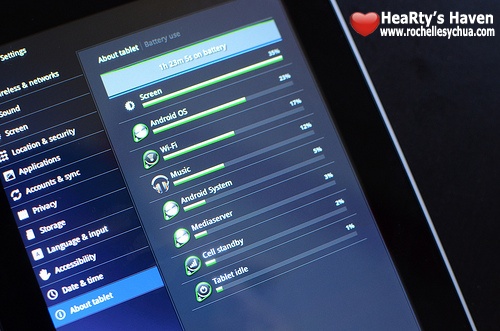
huawei mediapad battery

Conclusion

huawei mediapad 2

For a price point of Php 21,990, considering it has both WiFi & 3G capabilities, it’ll come as a cheap alternative.  If you’re on a budget and don’t need 3G capability, then I think Huawei MediaPad is a bit harder to recommend since the price point won’t be competitive.  That made me think that Huawei MediaPad caters to a specific market.

But what specific market is it?  For me, I believe it fits people who love to surf the web, watch videos, read emails and check social networking accounts on the go.  Huawei MediaPad tablet doesn’t quite replace our laptops but it certainly addresses this specific need for hi-performance on an extremely mobile platform.  Tech-savvy people will certainly appreciate the gadget.

Overall, I believe Huawei MediaPad is a good addition to the 7-inch tablet market.  The powerful dual core processor coupled with 3G capability and running on an operating system that is enhanced for tablet (i.e., Honeycomb) makes it a good contender in the market.  With a rumored update to Ice Cream Sandwich within 2012, we’re ensured to enjoy the newest features that Google Android has made for us.

Plus:

  • very clear screen
  • handy-size
  • nice unibody with convenient side grips
  • powerful performance
  • expandable memory
Minus:
  • response to swiping is jumpy.
  • images produced from camera is grainy.
  • gets very hot.
  • no accessories available in the market.

Huawei Video Presentation

Is this review not enough for you?  Then check out this video by Huawei introducing the MediaPad for your reference.  You can also visit Huawei’s Facebook Page for promos and updates.  As for me, I think this tablet has earned a permanent place in my bag.

Roch Signature

Smart’s Holiday Camp Out launches the iPhone 4S

Smart's Holiday Camp Out launches the iPhone 4S

December 16, 2011 is a date that all Apple fanatics have been waiting for.  It is today that Apple launches iPhone 4S in the Philippines.  But you know what really makes this day so special?  There’s no exclusivity anymore among mobile providers!  We, consumers, are now free to choose which telecom company we want to subscribe to for iPhone plans.

Smart Communications went all out when they closed down Powerplant Mall in Rockwell to officially launch the iPhone 4S!  When I got an invite to cover the event, I just couldn’t resist it!  I knew the event was going to be huge!

As expected, the event called Smart Holiday Camp Out was a BIG success!

Look at how many people attended and subscribed to a Smart iPhone 4S plan!  Everyone was willing to sacrifice their sleeping time just to be able to get their long-awaited iPhone 4S!  Tons of people lined up to register and sign up for a plan.

Smart iPhone 4S registration

Smart employees were working hard the whole night ushering eager customers where to go so they could get their new iPhone 4S phones.

Smart iPhone 4S process

Guests were also treated to free screenings of Mission Impossible 4: Ghost Protocol, free games at Q Power Station and free-flowing food & drinks at Burgoo/Sumo Sam/Cibo/Starbucks/Coffee Bean & Tea Lea.  Me and my friend spent most of our time playing games at Q Power station and we definitely didn’t miss watching Mission Impossible 4 (review coming up soon!).  Before we went home, we got ourselves drinks from Coffee Bean.  I think I had too much coffee that I ended up still wide awake at 6AM hahaha!  Oh well, it was worth it!  I had a great time enjoying all the free activities at Powerplant Mall.  I don’t think this will ever happen again so I was really glad I experienced it!  Thanks Smart! 🙂

Smart iPhone 4S activities

Smart brought in international artists Jermaine Dupri and Lupe Fiasco and they definitely brought down the house!  On the other hand, DJ Skratchmark, DJ Ace and DJ Mars Miranda brought music mixes that prompted guests to dance!  What a party!

Smart iPhone 4S Lupe Fiasco

There were tons of celebrity guests as well who hosted the all-nighter camp out making sure that the event would be something that no one will never forget!  KC Montero, Magic 89.9 radio jocks Slick Rick, Tony Toni, Sam YG, Mia and Andi 9 were among them.

smart iPhone 4S party

iPhone 4S is now available to Smart’s prepaid & postpaid subscribers at various plans.  When I first saw it, I was tempted!  I almost subscribed in spite of my plans of waiting for iPhone 5.  Smart’s iPhone 4S plans are that good!  I never thought it would be that affordable considering how iPhones were priced before.

Unfortunately for me, I recently just shelled out a lot of the money I had set aside for the iPhone on car repairs – a girl’s gotta have her ride, after all!  So for now, a new iPhone will remain a dream for me to fulfill next year.  By the way, I just realized that that’s what 4S means – well for me anyway… iPhone, 4 Sure!

Smart iPhone 4S Plans

Here are the details for iPhone 4S from Smart:

Smart Plans iPhone 4S

If you’re a prepaid subscriber, you can get iPhone 4S in Smart’s retail stores across the country at Php 33,200 for the 16GB model, Php 38,200 for the 32GB model, and Php 43,200 for the 64GB model.

Roch Signature

Y for Young – A Review of the Galaxy Y Netphone

Y for Young - A Review of the Galaxy Y Netphone

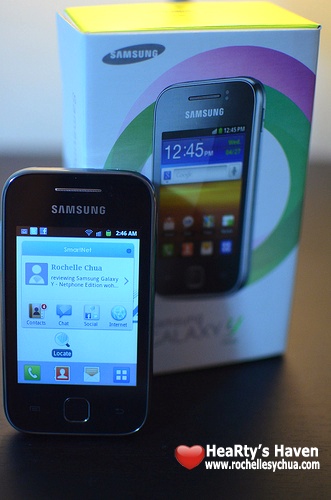
I got my hands on a demo unit of the newest Netphone handset from Smart.  It’s a smartphone by Samsung called Samsung Galaxy Y.  If you are familiar with the new naming scheme of Samsung, entry level phones have a letter Y in the model name.  Thus, Samsung Galaxy Y is for the young-minded.  Since it’s an entry level phone, we expect it to be affordable and cheap.

Here’s a quick overview of Samsung Galaxy Y’s specifications:

  • Size: 104 x 58 x 11.5 mm
  • Weight: 97.5g
  • Display: 240×320 pixels, 3.0 QVGA TFT Display,
  • CPU: 830 mHz
  • Internal Storage: 150MB (expandable upto 16GB via external microSD)
  • RAM: 290MB (usable)
  • Battery: Li-Ion 1200 mAh
  • Imaging: 2MP Camera + Video Recording
  • Data Connection: GSM/GPRS/EDGE/HSDPA 7.2
  • Frequency Range: GSM 900/1800/1900 UMTS 2100
  • Browser: WAP
  • Messaging: SMS/MMS/Email
  • OS: Android 2.3 Gingerbread
  • Connectivty: Wi-Fi/BT 3.0

What’s in the box?

Samsung Galaxy Y Inside the Box

Samsung Galaxy Y unit, battery, stereo headset, micro-USB charger, USB sync cable, quick guide and micro-SD adapter.

Netphone works because of SmartNet

Teenagers would love this because of the extremely social applications built into SmartNet.  Its features (Smart Center, Netphone Messenger, FX Messaging, Social Stream, Global Directory, Safe Internet Browsing) are all available on the Galaxy Y Netphone.  Although user experience varies among the different Netphone handsets, for its pricepoint, it looks great!

Samsung Galaxy Y is a great entry-level Smartphone

I love the look and feel of Samsung Galaxy Y!  It doesn’t look like a Php 5,990 phone at all.  Considering that it’s an Android-powered smartphone and is faster than its bigger brother, the mid-range Galaxy Ace, you will really feel that you are getting your money’s worth, and maybe more!

However, while I enjoy the physical attributes of Samsung Galaxy Y, the display screen just doesn’t cut it.  I guess this is the payoff for the low price.  The camera is good when lighting conditions are great.  However, don’t bother using your phone’s camera when it is dark.

Performance, on the other hand, is decent.  With a 830mHz processor, tasks that we normally use on our phones work pretty well.  However, if you are a heavy multi-tasker or if you use pretty intensive applications, then you might need to think twice if you want an entry-level smartphone for your needs.

If you’ve been longing for a smartphone and you are on a tight budget, then Samsung Galaxy Y Netphone is for you!  It removes some of the higher-end features but it’s one of the best among the entry-level smartphones in the market.  As an added bonus, you even have access to SmartNet for free till the end of this year.

Do you want it?

Samsung Galaxy Y by Smart

You can get your own Samsung Galaxy Y Netphone for free starting at the All-In Plan 800 and the Data Lite Plan 500. Or, you can check out their other exclusive plans.  Whatever plan you choose, you can be assured that you’ll have a blast staying connected with all your social network friends!

But wait!  I just learned that Smart is offering the Samsung Galaxy Y Netphone edition for free on Plan 349!  Yes, you read that right, it’s free on Plan 349 with UnliTEXT & UnliSOCIAL!!!

——————–
This is the initial draft of my article.  Final version can be found in Manila Bulletin’s November 21 issue. Also posted in MB’s website.

Roch MB Article Samsung Galaxy Y Netphone

Roch Signature

BPI Express Mobile App for Smartphones Launched

BPI Express Mobile App for Smartphones Launched

I’ve been very impressed with BPI lately.  Just a couple of weeks ago, I learned that BPI partnered with Globe Telecom to launch a commemorative Tattoo broadband stick that allows access to BPI Express Online and other BPI sites even without any prepaid load.

Last friday, I got to experience BPI’s slip-less service.  I was totally blown away that we don’t need to fill up deposit/withdrawal slips anymore.  We just need to go to the machine, enter the transaction and details by simply touching the screen, take the service number, go to the designated seats and wait for the service number to come up and proceed to the teller assigned.  Everything was fast, convenient and efficient.  I kept raving about it on my social media accounts.

Never did I realize that the Breaking Dawn Part 1 block-off screening I attended that same friday night was to publicly launch another new service of Bank of the Philippine Islands (BPI).  BPI just keeps thinking of ways to make our banking easier.  I’m a very proud customer! 🙂

The newest service that unfolded was something mobile and it’s a BPI Express Mobile application for Apple iPhones and Android Smartphones!  Whee!  Finally, an application that is made specifically for our phones.  Now, I don’t need to go to my phone’s browser just to go to BPI Express Online.

There’s an app for everyone.  You see there are two types of online accounts on BPI Express Online: Personal and Business.

BPI Online Baking Login

BPI has launched BPI ExpressLink Mobile for Business users while BPI Express Mobile was made for Personal users.  I’ll be showing you BPI Express Mobile for iOS as I have a personal account and an iPhone.  I was excited as I downloaded the application…

BPI Mobile Apps

Contrary to what we are used to, the BPI Express Mobile application has a special way of installation.  It’s not as easy as downloading from the appstore and logging in with our BPI Express Online username and password.

I’m not sure why BPI created it that way.  I’m thinking that maybe they were trying to make it secure as finances are sensitive stuff.

In order to make the BPI Express Mobile application work, you need to log in to your BPI Express Online account using your PC and go to Other Services –> Express Mobile Registration –> Mobile Banking.

BPI Mobile Banking Registration

BPI mobile registration

You will then receive a text message with the download link.  Once done, all you need to do is enter the same User ID and password that you use for BPI Express Online.

BPI mobile app download

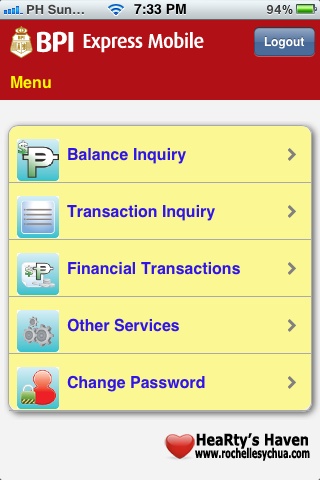
Through the BPI Express Mobile application, you can enjoy the convenience of conducting banking transactions from your mobile phone.  Features include:

  • getting real-time deposit and loan balances
  • transferring funds from your enrolled accounts to any BPI account
  • paying bills to more than 300 partner merchants
  • reloading prepaid phones and broadband sticks
  • ordering for a checkbook
  • email confirmation sent to your registered email address for every financial transaction done
  • Verisign security certificate which enables SSL for end-to-end encryption

bpi express mobile menu

BPI Express Mobile Features

With services like these, I surely am relieved to have chosen Bank of the Philippine Islands (BPI) as my bank.  They are truly serious when they say, “Let’s Make it Easy.”.  Bravo, BPI! 🙂

Roch Signature

Crumpler The Noose

Crumpler Noose

Ever since I bought the Nikon D7000, I became so addicted to photography.  No matter how big and heavy the camera is, I didn’t care and continued bringing it every single day with me.  I retired my point and shoot and stayed loyal to my excellent DSLR.

I’ve enrolled in several Basic Photography Classes.  I also talked to photographer friends to learn some tips and tricks in photography.  In case you haven’t noticed, I’ve been trying to improve my craft by taking better pictures (especially of food :P).

My camera came with a Nikon neckstrap which has been a vital accessory.  I’ve never ever taken it off.  However, I discovered something new today.  There’s a good strap for the camera and it’s actually a wrist strap!  Now, that’s cool!

It’s called Noose and it’s created by Crumpler.  I’m a HUGE fan of the Crumpler brand.  They produce high quality products.

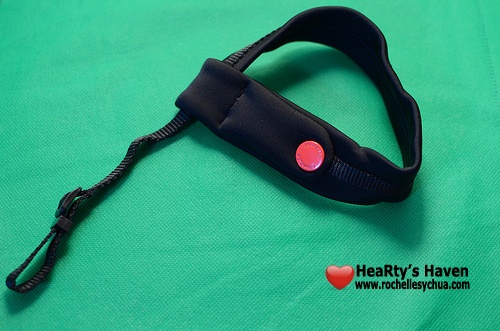
Crumpler the Noose

Having tried the wrist strap, I realized that it’s more compact compared to the neck strap.  I also remember that whenever I attend an event and most of the people have cameras, we would ask waiters to take pictures of the group.  However, at least 4 or 5 in the group have cameras, so I saw how the waiter struggled trying to put on multiple neck straps around his neck hehehe 😛  So maybe, in my case, I can have the photographer sling my camera in his wrist with my super strong Crumpler Noose 🙂

Crumpler Noose with Camera

The Noose will keep your camera attached firmly to your wrist.  It’s pretty secure and you don’t have to worry much about the strap breaking.

You see The Noose is made from ultra-strong polypropylene webbing and neoprene for soft moulded comfort.

  • Super Strength Webbing – keeps a vice-like grip on your camera.
  • Neoprene Cushioning – moulds to the contours of your wrist.
crumpler noose hand

You know how they say big things come in small packages?  Well, the Crumpler Noose has a big surprise for you: a small pocket where you can put your memory card!  That’s a pretty nifty feature, especially for those of you who take so many shots that you need to carry a spare memory card.  The Crumpler Noose is so well thought out that way.

Crumpler Noose SD card

You can get your own Crumpler Noose for only Php 850.00 at the Crumpler stores in Bonifacio High Street, SM Megamall and Trinoma.

Roch Signature

Loading...
X