If you’re on a budget and currently looking for an affordable postpaid plan for your internet needs, then you’re in luck!
Smart has just announced last friday that it’ll offer a postpaid subscription service that combines best-value plan with the best smartphone deal. Sounds nice right?
I was thinking what else can they offer apart from the existing Smart postpaid plans? When I analyzed the existing plans on Smart’s website, I realized that this new postpaid plan was different. It caters to a specific target market. The new postpaid subscription service which they call Data Plan 1000 comes with a good amount of free calls, SMS and mobile internet. What’s more enticing is that Data Plan 1000 is bundled with today’s popular smartphones at discounted and amortized prices. Wow!
I think I heard that Smart is absorbing some costs in order to get more Filipinos to try out what has been dubbed as ‘the only telco with a data network capable of providing the best connectivity to the world’s most advanced devices‘.
Here is some basic information about Smart’s Data Plan 1000:
500 SMS to all networks
500 voice minutes to any number within Smart network (Smart, Talk ‘n Text)
1GB worth of data
Monthly fee of Php 1,000
24-month contract
amortized rate of your chosen smartphone for 24 months at 0% interest
And these are the smartphones available with Smart’s limited-edition Data Plan 1000:
Samsung Galaxy Note – Php 900/month
Samsung Galaxy Nexus – Php 900/month
Samsung Galaxy Tab 7.0 – Php 800/month
HTC Sensation XE with Beats Audio – Php 900/month
HTC Evo 3D – Php 900/month
Nokia N9 – Php 900/month
BlackBerry Curve 9360 – Php 800/month
BlackBerry Bold 9790 – Php 900/month
BlackBerry Bold 9900 – Php 1,300/month
Sony Ericsson Xperia Ray – Php 500/month
Data Plan 1000 is only being offered between March 15 to May 15, 2012. So if you find this interesting then you better head off to any Smart Store or apply online via http://www.smart.com.ph/DataPlan1000. Also, this is a limited offering so once your 24-month holding period is up, you’ll have to choose to either end your contract or subscribe to any of the regular postpaid plans of Smart.
I have been using iTunes, a software that organizes and plays digital music and videos on our computer, for quite some time. I’ve been a happy user considering it’s a one-stop-shop for all music needs since it also includes iTunes Store which has everything we need to be entertained.
However, as 2011 drew to a close, a new service was launched by Apple, which made our music life much easier to manage, thus more fun! It’s called iTunes Match and it’s like Apple’s way of saying “hello Music Lovers! Here’s our pre-Christmas gift to you!” (though some may say it’s more like, “Let’s make it easier for the public to spend money when they have more disposable income.”).
What is iTunes Match?
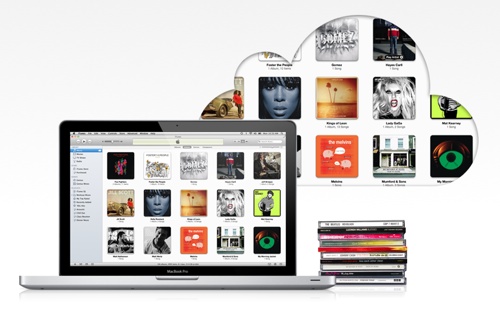
iTunes Match is a $24.99 yearly subscription service wherein all our music (no matter how we got them) can be stored in iCloud. As result, we can access our entire music library from all our iOS and Mac OS devices.
The idea is to have music stored on a remote server (not a physical machine) and access the music from any device by downloading.
Getting Started with iTunes Match
Upgrade iTunes to Version 10.5.1. You may do so by selecting iTunes -> Check For Updates from the iTunes toolbar.
In iTunes, choose iTunes Match in the sidebar. Enter your Apple ID and password and click subscribe for $24.99 (Keep in mind this is a yearly fee. As such, Apple will keep charging you for the service on a yearly basis unless you tell them otherwise).
iTunes Match will start gathering information about your iTunes library.
Your music will then be matched with music available in iTunes Store.
Lastly, unmatched music will be uploaded to iCloud.
To enable iTunes Match on your iPhone/iPad/iPod Touch, simply click Settings -> Music -> turn iTunes Match on.
Why is iTunes Match Good?
There are lots of things to love about iTunes Match. I was ecstatic when I finally subscribed to the service. I felt my $25 was well worth it and would not hesitate to renew in the years to come. It was a no-brainer and I recommend the service to everyone who uses Apple products and loves music.
Backup Music Library to Apple’s Cloud Server – no more worries about losing your music files when your hard drive breaks down or if you lose any of your iOS devices. Your entire music library is stored in the cloud and easily accessed via the Internet.
Ability to Play Music on up to 10 Devices – Once music is in iTunes Match, you can play your music on up to 10 devices including a maximum of five computers authorized to use your iTunes account and attach up to two Apple TVs.
Allows You to Access your Music Library from the Cloud – Subscribers will be able to download music to their iOS devices and other PCS without having to upload every single song or repurchase media. We can re-download purchased tracks, and automatically sync new purchases to multiple devices. When you want to play an album or song, you just need need to find it in the library then download to the device that you want to play it on. You can stream the music, or press an icon with a downward arrow inside a cloud to download it. My music collection is now complete and essentially identical on all my computers and on my iPad and iPhone, allowing me to access any of my songs from any of these devices, without manual synchronization via a cable, or paying more than once for the same song.
Tracks that are in iTunes will be added automatically – iTunes Store has over 20 million songs in its collection. It’s most probable that the songs you have in your music library are already in Apple’s database. Those songs once matched, will be added automatically to the Cloud. Uploading won’t be needed anymore thus saving us lots of time. Songs not available in iTunes Store will be uploaded from your computer to a personal locker in the cloud.
Songs bought from iTunes won’t be counted against 25,000-song Limit – iTunes Match has a limit of 25,000 per account. However, if you bought songs using the same Apple ID in iTunes, they won’t be included in the 25,000 songs limit. That means more storage!
Automatically Upgrade Music to 256-Kbps AAC DRM-free quality – iTunes Match is a quick and uber cheap way to upgrade. Especially if you have lots of music that are at 128kbps or even lower, this is applicable for people who have ripped CDs to save storage space when storage capacities were smaller before. By default, if iTunes Match finds a song in its library, it will replace that track with a 256-kbps AAC version. These files are DRM free when downloaded from the cloud — and appear to be the same files users purchase directly from iTunes.includes songs purchased from non-Apple music services or imported from CDs, or even those that were downloaded illegally.
Retains Playlists, Song Ratings and Play Counts – it’s not just songs that are being stored in the Cloud. Even the playlists that we organized carefully as well as ratings that we put in each song are saved! How cool is that? To make things easier, even play counts are saved too! I found that very useful as I listen to my favorite songs often and I use the play count to easily access my favorites. You no longer need to manually sync playlists with your iOS device via iTunes — instead it all takes place over the cloud. That means my iPhone can see playlists I’ve created on my laptop or desktop. The process works in reverse too. I can create playlists on my iPad or iPhone and then access those playlists from within iTunes on the desktop or from another iOS device.
Not a Streaming Service – on a computer, any songs stored in iCloud will stream over the air when played, though you can download them at any time by clicking the iCloud download button. iOS devices will start playing tracks from iCloud as they download and will store them so that you can listen to them later even if you don’t have a network connection. Apple TV only streams songs. That means a full copy of the song is stored for listening anytime, rather than streamed on demand over wireless networks, which can be spotty. There’s nothing more annoying than having your songs stop and start as your connection flutters.
iTunes Match is not Perfect
While iTunes Match gave a huge smile on my face, it has also provided some headaches (or even heartaches!). Yes, I’m a huge obsessive compulsive (OC) lady. I took so much time managing my tremendously big iTunes Music library to the point of individually putting album artworks and lyrics to each of the songs. Due to this, I was extremely disappointed when iTunes Match caused album art to never appear or to only show up when a song is playing.
I had a great number of songs that are in fact in iTunes Store but weren’t matched and instead, uploaded in Apple’s Cloud servers. This is another frustration in iTunes Match service. iTunes Match couldn’t match several albums in my collection, even with proper metadata. It’s too bad there’s no option to manually match tracks to their iTunes Store counterparts, which would save unnecessary uploading.
Since I have more than 10,000 songs in my music collection. I had to wait 3 long days before all the songs get stored in the cloud. Slow internet connection had something to do with it too.
Last, but definitely not the least, I got the shock of my life when I lost all my stored music on my iPhone when I activated iTunes Match. Apparently, iTunes Match will delete music stored on iPhone and will need to replace it by downloading songs from iCloud collection. But I found a solution for this inconvenience – You can turn iTunes Match off on your iOS device and download the music from your iTunes library. Then turn iTunes Match back on your iOS device and your cloud music will appear along with the music downloaded from your iTunes library.
Those mentioned are the only complaints that I had. However, some might find the ff. annoying too:
iTunes Match is Limited to 25,000 Songs – If you’re a hardcore music fan, then I’m sure 25,000 song-limit will definitely set you back. iTunes Match only works for songs, not audiobooks, videos, ringtones, podcasts and others.
Songs greater than 200MB won’t be accepted – in all honesty, is there any music that is as big as 200MB?
Is iTunes Match for You?
Just like all things, iTunes Match is not for everyone. Like for example, if you don’t have an iOS device or a Mac OS device, then subscribing to iTunes Match won’t make sense. Another one is if 100% of all your music are bought from iTunes, then it doesn’t make sense since iTunes in the Cloud (keeps all the music you purchased from the iTunes Store and makes it available to all your iTunes compatible devices) is completely free.
Let’s say you subscribed to iTunes Match then decided not to renew. You don’t have to worry as you get to keep all your 256khz music matched during the time of subscription forever. You can access them by going to ‘purchased music’ from iTunes to redownload it. The only thing that you will lose is central storage – iCloud will no longer stream/download songs to your devices.
As for me, iTunes Match’s $24.99/year subscription fee is worth every penny. It makes my life much more easier especially that I have more than 10,000 songs available in the Cloud and whatever changes I do on my music library will automatically be updated in my devices. How awesome is technology now?
I love it when companies embrace technology. There’s always room to grow and there’s always something to innovate. One of the companies that I admire is Smart Communications as they continue to drive innovation and bring it to customers nationwide.
From February 27 to March 1, 2012, Smart is actually represented in the Mobile World Congress 2012 in Barcelona, Spain. Smart is set to demo the WAC applications that has the in-App billing feature. If you remember, Smart was able to demo the Smart Netphone in last year’s event. Look at us now, almost all Smart customers are using SmartNet and enjoying it!
I’m glad that Smart held a press briefing last night demonstrating the first few apps that participated in the effort in delivering a simple, safe and easy-to-use payment experience for customers.
This is through the Wholesale Applications Community (WAC), an open global alliance made up of leading communications companies like network operators, device and network equipment manufacturers. Smart Communications is part of the Board of Directors. That explains why Smart is bringing in WAC’s payment API, a new technology which enables software developers to charge Smart mobile users directly through their prepaid or postpaid accounts.
A WAC App looks like any other mobile application, but is written using web technologies. WAC Apps can run on any smartphone (i.e., Android) for which a WAC runtime is available. Smart highlighted applications created by Filipino developers. I find them really inspiring. And I believe in just a few weeks or months, when we see the first few Filipino-made WAC applications being successful, there’ll be more. Of course, in the end, the customers get to win as things are becoming much easier and more convenient.
The common denominator in the applications as described below is the Payment API. There is no more need for users to enter a credit card number, the user only needs to confirm purchase and it will be automatically charged on their phone bill. The ease of use makes it the more exciting.
So without further ado, these are the applications that were showed to us during the press briefing:
FHM Philippines
The FHM Philippines application is something I’m sure every Filipino guy would love to have on their mobile phones. Developed by Hand Interactive, Inc., the mobile app features a collection of the hottest celebrity covers of FHM magazine.
Other features include unpublished photos handpicked by FHM editorial team, write-ups per cover girl and most importantly in-app operator billing which allows users to download their favorite photo sets for Php 15 charged directly to their Smart mobile account. Now, isn’t that too cool?
Now you guys can have your favorite celebrity sexy photos on your mobile phone. Yes, I know you want them. I still distinctly remember how guys drooled over the FHM 100 Sexiest Women in the World show last year. If that show was successful, I’m sure this app would. Of course, the in-app operator billing feature will make it so much easier for you to own your favorite FHM photo covers.
FHM Philippines mobile application may be downloaded for free from the Android marketplace very soon.
iCare
Filipinos are known to be compassionate and helpful. That is why I think iCare is a great mobile application. It allows people not just in the Philippines but around the world to donate to Philippine Red Cross and other non-profit charitable organizations.
The capability to send monetary donations through your Smart mobile account makes it much easier to help! As of the moment, the Philippine National Red Cross is the main beneficiary but soon iCare will expand to include other similar organizations.
I can’t wait for this mobile application to be available. It always feels good to help people in need.
TopApp
I don’t recall anyone who doesn’t have any mobile phone. Especially in the Philippines, everyone is just connected. You can see companies (even non-telcos) hold contests that gives a chance to customers to win prepaid mobile loads. So it just makes a lot of sense that people would want to have TopApp in their mobile phones.
TopApp is an application that allows users to send phone credits to a Smart prepaid user in the Philippines. You can send prepaid load remotely with just a few clicks. There are different denominations available: Php 30, Php 50, Php 100, Php 200, Php 300 and Php 500. The sender then will be billed by his/her telecom provider.
Now, everything is just easy and convenient! I’m in total awe!
Shoephoric
Shoephoric might not be for everyone. As the name implies, Shoephoric is a mobile application for shoe lovers. It enables people to share their shoe collection and discuss about them with other shoe lovers.
I believe ladies would love this application. For guys, I’m not sure they will find this interesting. If ever, I guess only 5% of the male population might download this app or use it. The story is totally different with women though. Like me, for example, I own more than 50 pairs of shoes! I even have my own cabinet just for shoes at home. So I’m sure when the mobile application comes out, I’ll be the one of the first to download.
What sets it apart is a feature called ‘Make Me Shoephoric’. It’s a feature wherein your friends can help gift you your dream shoe by pitching in money using the in-app operator billing. So if your friends have Smart mobile accounts, they can help fund the shoes you’ve always wanted.
The Shoephoric app will be available soon from the Android marketplace.
I was able to download TopApp so far. I can’t wait to see the rest of the applications come out of Android Marketplace. I’ll surely make good use of them and hopefully they’ll be free to download.
I had a new discovery and I was too giddy about it! Have you ever heard of earphones that are scented? What more if those earphones are disguised and hidden in a juice box?
Juice Box Earphones is a product of a new company called Juicy Electronics. Simon, the man behind Juicy Electronics, had been trying to put up his own business until he finally found the right concept last 2010.
His product, Juice Box earphones, is new, creative, unique and uber cute! I’m positive that it’ll be a very nice gift to your friends and family alike!
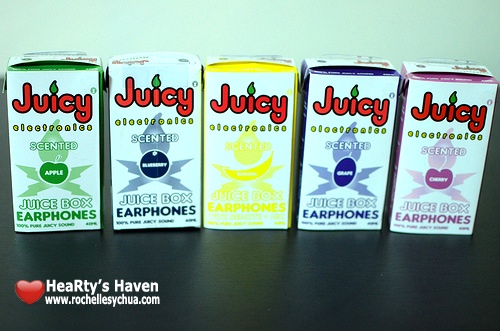
There are six juice flavors available: Apple, Blueberry, Banana, Grape, Cherry and Strawberry!
I took the time to smell each of the five flavors I got my hands on. Unfortunately, strawberry wasn’t included in the shipment. However, in spite of loving the color red and wishing to own one, I let go of strawberry as seeing the other variants of the cute ‘lil invention lightened up my mood.
Juicy Electronics staff called out blueberry scent as their favorite. However, I just loved the very mild and subtle smell of the banana scented juice box earphones. The color yellow makes it a perfect choice as well since I’m carrying a yellow bag. How matching!
People might find it odd to own earphones that smelled so delicious. But isn’t it too cool? The whole product from the earbuds to the cable and even the silicon tips are scented! Other people might get so hungry that they’d bite into the accessory (well, we certainly hope this won’t happen).
The packaging of Juice Box Earphones is another unique and fun feature of the product. The box is color-coded according to the scent of the earphones. There’s indigo for blueberry, yellow for banana, green for apple, violet for grape, pink for cherry and red for strawberry.
I just love that the box literally looked like a real juice box complete with nutrition information, list of ingredients, bar code and even the quality guarantee! It’s definitely such a joy looking at the product.
Apart from the beautiful aesthetics of Juice Box earphones, we can’t discount that it produces great sounds. With a frequency response of 22 KHz, it provides good bass and you can listen to music happily.
The baffles are very effective which might be a problem if you have to pay attention to what’s going on around you while using the headphones because it totally shuts out ambient sounds.
Of course, the juice box earphones seem to be designed specifically for use with mobile phones because the remote + mic are placed in an ideal position to carry on a phone conversation. Other phone headsets require you to lift the cable up so you can bring the mic closer to your face before you can make any good use of it. With the Juice Box Earphones, you have no such worries. The mic hangs naturally at the level where it can best pick up your voice. Of course, you can still use it as regular earphones and the sound quality is still better than average. It’s not Bose but it will let you listen to your music like a boss.
You can get Juice Box Earphones (Php 1,200) in the Philippines from Digital Walker stores in Eastwood Mall, Virra Mall, Parksquare 1, Mall of Asia, Trinoma, Abreeza and Cebu.
When I got the review unit of Huawei MediaPad, I realized that I need to get a case for it. I was worried that I might break the gadget if I just carry the tablet around inside my bag. Considering that I have tons of things knocking around in my bag in there, it’s practically impossible for the Huawei MediaPad not to get scratched.
So I went to the mall, specifically Park Square 1 where most computer & gadget shops are located in Makati. I strolled around entering shops looking for any case that would fit the Huawei MediaPad. It didn’t take long for me to realize that there were no accessories specific for the newly released device.
I changed my strategy and just looked for generic cases for 7-inch tablets. Most of the gadget shops only carry cases for specific brands and unfortunately, it didn’t fit my Huawei MediaPad 🙁
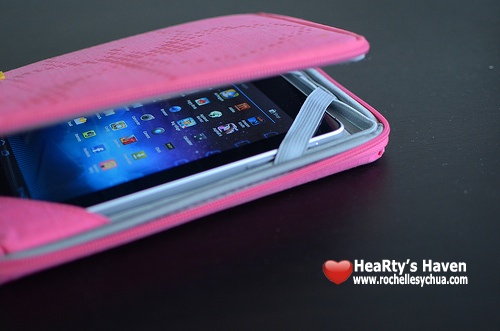
Luckily, when I entered Digital Walker, I found Golla Slim Cover! There were 2 colors on display: Pink and Black. I ended up getting the pink color as it was cute!!!
I put the tablet inside the Golla case. It didn’t fit perfectly but at least, it protected the 7-in Huawei MediaPad.
Here’s the information about the 7″ Slim Cover by Golla for Generation Mobile:
Colors & Materials
Cover – Pink, 100% Cotton
Lining – Silver, 85% Polyester, 15% Elastane
Dimensions
Device compartment: 140x215x11mm
Outer measurements: 150x220x23mm
Features:
four-point mounting system secures your device in place
embossed EVA-cushioned interior for stylish protection
front cover folds back completely and was designed with comfort in mind
zipper closure
The Golla Slim Cover serves its purpose. It protects my Huawei MediaPad from scratches and bumps when I put it inside my cluttered bag. It’s eye-candy too . I’m actually proud whenever I take it out as it shows a bit of my personality. In other words, I look girly when I hold it, hahaha! 🙂
The Golla accessory opens up like a book. We do use our tablets to read books right? So that feature is a nice one!
The 7-inch Slim Cover by Golla Bags costs Php 1,290.00 and is available at Digital Walker branches nationwide.