Category: Technology

Smart Netphone 701 Review

Smart Netphone 701

Several days ago, I shared with you my first few impressions about the Smart Netphone 701.  I’m just so glad that it’s finally available now in all Smart Centers and a lot of us have gotten ourselves a unit.  If you’re still undecided and would want to get some feedback from current users of Smart Netphone, then please read on.

I’ll be sharing in this post my experience with the Netphone 701.  It has been a week since I’ve been actively using it.  My main phone has to take a back seat while I explore all the features of this beautiful-looking phone.

It wasn’t my first time to review an Android phone but this is different because it’s a Smart-designed phone.  But you know what?  The Netphone 701 is actually a re-branded ZTE Blade phone.  Don’t expect this phone to compete with the iPhones & the Samsung Galaxy SIIs.  We can consider the Smart Netphone 701 a mid-range smartphone.

Unboxing
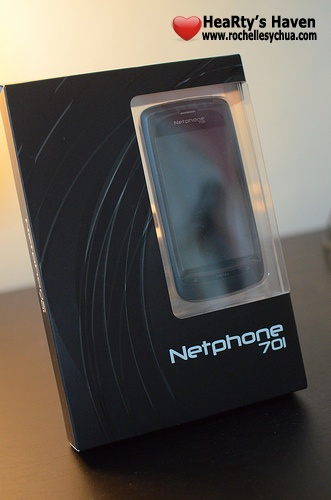
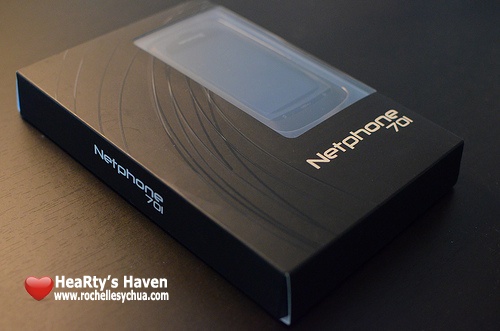
Smart Netphone 701 packaging

Oh, how I love the packaging of Netphone 701.  It’s very straightforward.  You can even see the phone through it.  I like the simplicity of the box design as well.  The box and the phone have matching colors too!  Cute!
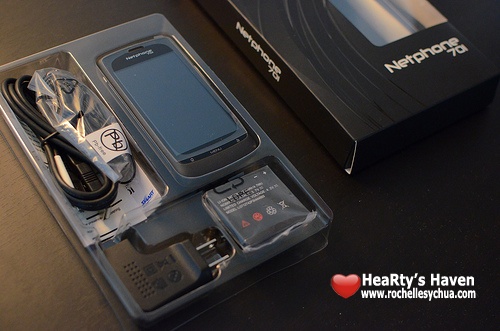
Smart Netphone Unboxing

Inside the box are the ff.:

  • Smart Netphone 701 Unit
  • Battery
  • USB to Micro USB cable
  • Charger Adaptor
  • Earphones
  • Unit Warranty
  • Netphone Quick Guide

Smart Netphone Camera

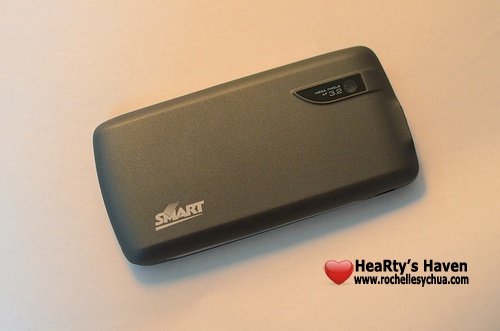
I immediately grabbed the unit and checked out its design.  I noticed then the camera of the Netphone 701 plus the Smart logo at the back.  I was like, wow, the Netphone 701 has a 3.2 megapixel camera (my iPhone’s camera only has 2 megapixels :P).

Smart Netphone SIM

Since I intend to have the Smart Netphone 701 as my secondary phone, I opted to use a Smart Buddy pre-paid SIM card.

Smart Netphone Manual

I love how the Netphone Quick Guide was laid out.  It’s very visual, super easy to understand and so easy to follow.  No boring manual this time!  Wohoo!

Specifications

  • Qualcomm MSM7227 chipset
  • 600 MHz ARM11 processor
  • 3.2 megapixel camera
  • Android Froyo 2.2
  • 120g, 114mmx56mmx12.2mm
  • 512 MB on-board memory + 2GB Micro SD card
  • 3.5-inch 800×480 WVGA multi-touch screen with 262k color display
  • FM radio tuner
  • GPS support

Experience

I’m not going to lie.  I’m not a big fan of Android OS.  In all honesty, I’m a pretty huge Apple fan.  That means I prefer iOS over android OS anytime.  But why do I like to keep this Smart Netphone 701 which is an Android phone?  One reason — SmartNet.

Smart Netphone Design

SmartNet is basically a new service that consists of a group of applications suited for Smart users.

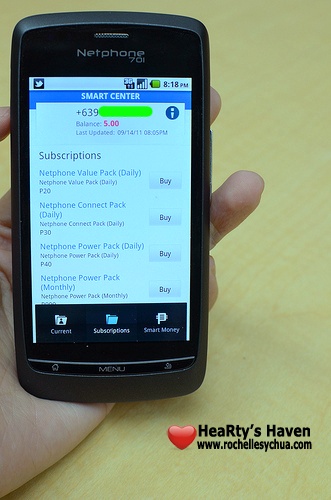
  • Smart Center

Smart Netphone SIM Load

Smart Netphone Subscriptions

This is a super useful service.  Imagine saving so much time calling the Smart Customer Service.  You already have the usual information you need whenever you call the hotline.

With Smart Center, you can do the ff.:

– Check your postpaid bill or prepaid load balance instantly
– See and track your current subscription
– Choose and purchase packages to subscribe to
– Reload your phone without visiting a SMART loading center
– Pay your bill without going to a payment center

My favorite feature has got to be knowing the load balance of my prepaid SIM card instantly!  Uber cool! 🙂

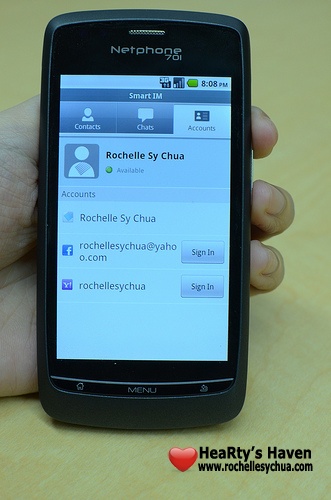
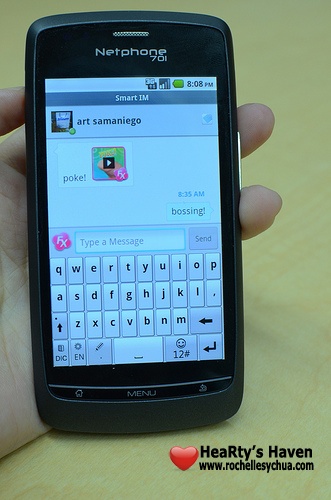
  • Netphone Messenger

Smart Netphone Social Media Accounts

Smart Netphone Chat

With Netphone messenger, we can chat with friends on Facebook, YM and Smartnet all in one nifty application!  I rarely use the chat feature of Facebook and YM but I use SmartNet’s a lot.  That’s because we don’t need to spend a single centavo if we send messages to fellow Smart Netphone users (until December 31, 2011 that is).

  • FX Messaging

This is the cutest feature of SmartNet!  If we want to say hi to our friends, why not do it in style?  FX message is emotive messaging, a short video that we can share to our contacts.

  • Social Stream

Smart Netphone Status Update

Smart Media Social Stream

SmartNet’s Social Stream is the main driver why I want to own a Netphone 701.  Since the service is being offered by Smart for free till December 31, 2011, I wanted to grab the opportunity.  I just hope Smart will continue to keep it free next year.

A lot of us are super users of Facebook and Twitter.  I must admit that I even subscribed to a postpaid data plan before just to be able to update my Facebook and Twitter accounts when mobile.  If I hadn’t lost my MiFi in a trip, I would have continued with the expensive monthly data plan.  Good thing, Smart launched this at a right time.  Now, I’m saving a lot of money because of this new service.  I get updated with a lot of stuff through the Social Stream.

  • Global Directory

Smart Netphone Global Directory

I never forget my friends’ names but I never remember their exact mobile numbers.  So when I saw the global Directory, I was ecstatic!  All I need to know is my friends’ names and I can add them on my Netphone’s contact list.  As long as they are registered on smartnet.ph or has a Smart netphone, then we can definitely find them in the Smart Global Directory.

  • Safe Internet Browsing

Smart Netphone Internet Setting

You may be wondering how we can access Netphone messaging and Social Stream without being charged a single centavo.  The answer is SmartNet’s Safe Internet Browsing.  As long as you turn it on, then you don’t have to worry about being charged when using the SmartNet’s services.  If you’re clicking links outside of SmartNet services, browsing charges will apply (Php10 for 30 minutes).

How to Get One

Smart Netphone Charging

Smart Netphone 701 is available on prepaid at Php 9,900.  However, you can get it for free at postpaid data lite plan Php800.  You can find full details on plans & subscriptions with Smart Netphone 701 at the Smart Netphone website.

Do I recommend you get it?  Well, it really depends on your needs.  As for me, I’m happy having the Smart Netphone 701 as my secondary phone.  I use it primarily to update my Facebook & Twitter accounts as well as view Facebook status messages and tweets when mobile.

Roch Signature

Smart launches the Netphone

Smart launches the Netphone

I was rushing my way to Megamall last night as I knew that Smart Communications, Inc. would be launching the much-awaited Netphone.  The event started 7PM but since my car was number-coded, I had to arrive late.

It was really exciting to know what Netphone is all about.  I’ve been hearing rumors for several days about it.  I knew that the Netphone is an Android device and it’s designed by Smart.  I also heard that it’s going to be really cheap and affordable.

I was sad because as soon as I arrived at the beautiful Smart Jump Experience Center in Megamall, I noticed that the event just ended. 🙁

Smart Jump Experience Center

I wasn’t able to catch the presentation and the demo of the device.  I wasn’t able to catch the raffle too!  I missed several media friends as well because they left already.

Luckily, the Smart folks were more than willing to provide another demo for us latecomers.  Here’s what I learned about the Netphone:

  • the Netphone runs on Android Froyo (version 2.2)
  • full integration with Smart Wireless Network thus the Netphone can tell us what our prepaid load balance is or when our next bill is due if on postpaid.
  • Netphone’s Social Stream combines our Facebook and Twitter accounts.  We don’t need to check both accounts separately anymore.
  • Netphone messenger gives us the freedom to send messages, share photos, videos & contact numbers and chat with friends (Netphone to Netphone) without a need to spend a single centavo!
  • FX messaging is an exclusive feature of the Netphone.  It’s basically short video messaging or emotive messaging.  Samples include: send a kiss, buzz a friend, send a beer!, megaton?!
  • We can be assured that we can surf the internet being protected from viruses.  The Netphone is secure!
  • The Netphone’s Global Directory stores contacts on the web in the cloud.  We don’t have to worry about phone memory anymore 🙂
  • capture videos and photos using the 3.2 megapixel-camera with Auto Focus.

Smart Netphone Presentation

There were several demo units all over the place so I was able to play with one.  Oh my gee, I so want to have one!  But you know, it’s very affordable!  The biggest surprise for me is the price.  With all those features, the Netphone only retails at Php 9,900.00 for a prepaid kit and will come free with postpaid plan 800.

Smart Netphone Demo

Smart will start offering the Netphone on September 10, 2011.  It will only be a few days wait and we can get our hands on our very own Netphone.  It’s sooooo tempting!  I really want one! 😀

Roch Signature

Hisense Mono Headset Mini HB 200M Review

Hisense Mono Headset Mini HB 200M

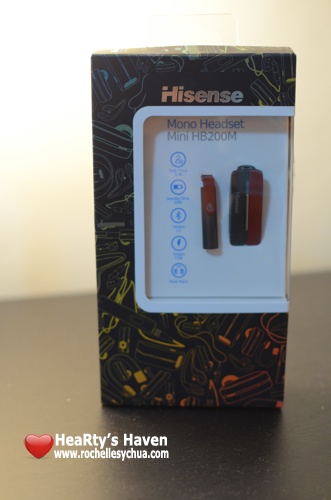
I’ve always wanted a bluetooth headset.  I do not know why, but I never attempted to purchase one.  I guess it’s destiny because I finally got hold of Hisense HB200M Mono Headset for this review.

At first glance, I already liked it.  It’s small, handy, beautifully designed and I got the color red (my favorite color!) 😀

I immediately opened the box and saw the ff. items inside:
HB200m Mini headset, Magnetic clip, Necklace, three ear bud sizes, in-ear bud, flexible ear hook, USB charging cable, USB AC charger and user manual

Hisense Mono Headset accessories

I’ve been using the bluetooth headset for one week and I must say, I loved it.  The Hisense HB 200M served its purpose.

You know that it’s really not safe for us to drive and talk on the phone at the same time.  However, with this cute lil gadget, you won’t have to worry at all.  Three words I can describe this situation: No more hands! 🙂

Here’s the technical specifications:

  • Up to 5.5 hours talk time/standby time up to 150 hours
  • rechargeable battery with charging option from AC power supply or PC via USB cable
  • Weight: 7.5 gr.
  • Operating range up to 10 meters (approx. 33 feet)
  • Headset and hands-free Bluetooth profiles
  • Bluetooth version 2.1

While Hisense HB200M has those impressive features above, there are 3 other features that I want to highlight:

Smart wearability

Hisense Mono Headset pendant

The Hisense mini bluetooth headset comes with a magnetic clip that holds the headset and enables us to wear it as a necklace.  It’s actually a good fashion statement.  I do have to warn that if you aren’t careful enough, you might lose your headset.  You see, they are just connected via magnet.  As much as I like this feature, I opt not to use it.  I don’t wanna lose my first ever bluetooth headset.  It’s that sentimental to me haha!

Small size and smart

I didn’t mind that the manufacturer removed the ability to adjust the volume using the bluetooth headset as we can do it with our phone anyway.  I’d much rather want the bluetooth headset size to be small than that feature.  I can get away with it.

The multi-function button (MFB) is basically the only thing you need to make the gadget work.  The MFB serves as the pairing button, answer/end button and turn on/off button.

The LED light serves as the visual guide to see if the HB200M is charging, pairing or in stand-by mode.

Here in the Philippines, it’s very common that a lot of us have 2 phones.  With the telecoms offering unlimited text and calls, a lot of us couldn’t resist it.  So it’s really such a relief that Hisense HB200M has a multi point connection that enable us to connect to 2 bluetooth device at the same time.  It gives us the freedom of having only one bluetooth headset to use both of our phones.

Packed with accessories

Aside from the magnetic clip and ear hook, Hisense HB200M comes with 4 ear buds.  One small, one medium and one large but the one that I ended up using is the in-ear bud.  I appreciate that I can clearly hear whoever I’m talking to with the in-ear bud even if my car stereo is on.

Hisense Mono Headset earplugs

Amazing isn’t it?  For me, as long as Hisense HB200M does its job, it’ll get a thumbs up from me.

Hisense Mono Headset Mini HB200M does the ff. flawlessly and it’s more than enough for me:

  • answer calls
  • end calls
  • reject calls
  • voice dialing
  • last number redialing
  • call waiting
  • put call on hold

Hisense HB200m is a mini bluetooth headset that has everything you need.  It has style, functionality and usability.  It’s being sold at Php 1,450.  Available in 4 colors: silver, gold, green and red.

Hisense HB 200M

What are you waiting for?  Go visit any of the ff. stores in the Philippines to get yourself one!

  • Digital Hub
  • Digital Walker
  • Beyond the Box
  • Adi Gadget World – Park Square 1
  • 5th Ave. – Shangri-La Mall
  • ComCentre – Sta. Lucia
  • Power Telecomshop – SM North Edsa Annex
  • Techno Mobile Hub – SM Marikina
  • New Venice – Park Square 1
  • Topnet – SM Megamall
  • Sir Lance – Festival Mall
  • Oxvor – Starmall Alabang
  • Cell Power Sales
  • Unitech
  • Jerry Solutions
  • Mobile Territory
  • Eyo Sales
  • ITelecom
  • Mobile Care
  • Bluelite
  • Round Circle – Festival Mall
  • Starcircle – Starmall Alabang
  • Celvitek
  • First Choice Cellshoppe
  • Mobile Experts – Park Square 1
  • Owtel – Starmall Edsa Shaw
  • Cyberwidgets – SM Masinag
  • BSD – Mall of Asia
  • Techno Kid – SM San Lazaro
  • Techtel – Robinson’s Ermita
  • Bionic HD

Roch Signature

Metro Manila Traffic Navigator by MMDA and TV5

Metro Manila Traffic Navigator

Yesterday, MMDA and TV5 officially launched the Metro Manila Traffic Navigator.  I was lucky to be one of the bloggers invited to the event.  At the media launch, both MMDA and TV5 executives were present to share with us the country’s first ever digitized traffic information system.

The Metro Manila Traffic Navigator launch was hosted by TV5’s very own Paolo Bediones and Cherie Mercado.

metro manila traffic navigator launch hosts

Personally, I was very excited for this.  This is a proof that we are moving forward and this is what public service is really about.  The partnership between Metro Manila Development Authority (MMDA) and TV5 was able to make Metro Manila Traffic Navigator possible for all of us.

What is Metro Manila Traffic Navigator?
The Metro Manila Traffic Navigator is the easiest and most effective way to view the traffic situation in Metro Manila.  With the information provided by the traffic navigator, motorists and commuters can save a lot of time.  We all know how bad the traffic is in our city and I just appreciate that this service being provided by MMDA and TV5 can help us save a lot of frustrations.

Metro Manila Traffic Navigator by MMDA and TV5

The Traffic Navigator can be accessed over the internet through http://mmdatraffic.interaksyon.com.  Actually, a public beta version of the site was released last June 29.  Since then, at least 6,000 users have been accessing the Metro Manila Traffic Navigator everyday.  I even shared it with friends and told them how impressed I was.

Hopefully, a lot more people will get to use it as TV5 and MMDA launched it officially last August 1.  I do wish that I get to spread the news through this blog.  The Metro Manila Traffic Navigator is a great tool and I must say, it has been a part of my everyday life already.

I was actively tweeting and facebooking last night as the panel answered questions from us.  I wanted to share every bit of information to everyone!  I hope all other government agencies follow suit.  I’m passionate about technology and I’m just glad that we are finally embracing it.  In the panel were TV5 News and Information head Luchi Cruz-Valdes, Interaksyon.com editor-in-chief Roby Alampay, TV5 media head Carlo Ople, MMDA’s Yves Gonzalez and MMDA chairman Francis Tolentino.

metro manila traffic navigator panel

With the Traffic Navigator, we can check out the traffic along 6 major roads: EDSA, Quezon Avenue, Espana, C5, Roxas Boulevard and SLEX.  The MMDA Metro base updates the traffic situation for over 60 intersections every 15 minutes.

I love the site’s design as it’s very easy to understand and I love how information was graphically presented.  We can also share the traffic situation quickly via Twitter or Facebook.  Everything is just so simple!

The Metro Manila Traffic Navigator is optimized to work in any browser whether mobile or web and can work in any operating system.  So whether you have Windows-powered computers, Mac, Linux, iPhones, iPads, Android phones or Windows mobile, you can access the navigator perfectly.

There are 3 different views available in the Metro Manila Traffic Navigator.

  • System View

metro manila traffic navigator system view

The system view shows the major roads in a simple diagram.  It uses colors to distinguish each of them.  We can easily see at first glance the traffic situation as it was presented in a very simple manner.

We have the option to choose only what we want to see.  Do we want to see only northbound, southbound or both?  It’s really impressive that the team took into account everything.

  • Line View

metro manila traffic navigator line view

The line view is my preferred option as I can see at first glance the traffic situation in a certain area.  It’s being presented in a table manner.  The information is pretty straightforward.  If I want to know more, I just click on the icon.  Superb!  Information is really powerful!

  • Google Map

metro manila traffic navigator google map view

For those who want to find an alternative route at the same time, would want to check the traffic situation, can opt to choose the Google map view.  This is especially helpful for people who are very dependent on maps.  Not me definitely, as I can’t read maps hahaha!

Impressive, right?  I really, really love the Metro Manila Traffic Navigator!  Very soon, we’ll be able to download an iOS application by Interaksyon.com team which will come bundled with instant access to the Traffic Navigator.  I cannot wait for that.

Interaksyon iOS app

Here’s the audio-visual presentation shared during the launch (for your reference):

That’s my good news for the day 🙂  The Metro Manila Traffic Navigator future releases will include more data coverage as well as ability for users to input data.  Truly exciting!  Thanks MMDA and TV5 for this innovation.

——————–
Metro Manila Traffic Navigator
Partnership between MMDA and TV5
http://mmdatraffic.interaksyon.com

Roch Signature

Hed Kandi Pure Kandi Headphones Review

Hed Kandi Pure Kandi Headphones

I spend most of my time listening to music.  Especially at work, I make it a point to listen to my favorite songs when I’m not in a meeting (music helps me relieve stress).  I’ve been looking for a great tool to make my listening experience good.  Unfortunately, I wasn’t that lucky even if I tried some of the more expensive branded earphones in the market.  I’m very positive this will change because I now have one of the beautifully designed headphones by Hed Kandi.

A very successful music brand, Hed Kandi, have defined the sound and vision of the international party scene.  The name is a modified spelling of Head Candy, which is of a resemblance to eye candy.

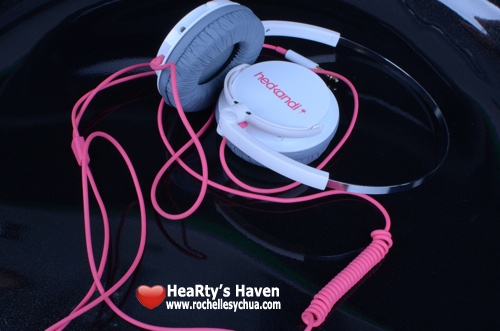
Eye candy is how I describe Hed Kandi Pure Kandi Headphones when I first saw them.  Oh boy, the designs were just too cute!  With colors like white/coral, blue/pink and purple, I’m sure girls will love the Hed Kandi headphones.  Guys don’t have to worry though as there’s black color meant for you 🙂

Hed Kandi Headphones have 4 different styles available:

  • Kandies (Php 490.00) – soft-touch, rubber-housed earphones with a colored 1.3 meter cable, a matching end plug and gold-plated 3.5mm jack.
  • Disco Heaven (Php 1,090.00) – Lightweight and functional headphones with ultra-thin headband and soft-touch ear- cups.
  • Discotheque (Php 1,190.00) – Stereo headphones with single-sided cable.
  • Pure Kandi (Php 1,990.00) – Stereo headphones with unique ultra-thin adjustable headband.
The Hed Kandi Pure Kandi Headphones is advertised for the frequent travelers which makes it my choice.  I certainly do have a lot more reasons why I’m loving my new Hed Kandi Pure Kandi headphones.
Before I do that, here are the technical specifications:
  • Driver diameter: 50mm
  • frequency response: 20-20,000Hz
  • impedence: 32 Ohms
  • sensitivity: 103 dB
  • max input power: 100 mW
  • cable length: 1.5m

Here’s a description of Pure Kandi from the Hed Kandi’s website:
Arouse your aural senses and book yourself a ticket to destination chic with these high-fashion headphones easily packed away with foldaway design for any jet setter’s luggage. The fashionisto in you will love the unique ultra-thin, adjustable headband suitable for any hairstyle, whilst your ears will be thanking you for the ultra soft ear-pads with metal exterior.

Like I said earlier, I have tons of reasons why I’m loving this new Pure Kandi headphones of mine.  I’ve been using it for a week.  I’m completely satisfied and I’m sure I’ll be using it more and more.  Hopefully, Hed Kandi headphones are durable as I’d be so sad if it doesn’t last a long time.

Packaging & Design

Hed Kandi Packaging

First impressions are definitely important and Hed Kandi just didn’t disappoint.  See the beautiful packaging of the Pure Kandi headphones (above photo).  The headphones are secured inside the plastic and paper packing with the beautiful artwork by Jason Brooks displayed outside the box.

The Hed Kandi Pure Kandi headphones are available in 4 colors: White/Coral (my choice), Blue/Pink, Purple and Black.  It might be targeted for the female demographic but as I said earlier, the black one is perfect for guys.

Comfort & Ease of Use

folded Hed Kandi Headphone

These Pure Kandi headphones have one of the thinnest headbands which is suitable for me as I don’t want it to mess with my hairdo.  It doesn’t look heavy too and it can match with any of my outfits.

I also appreciate that Pure Kandi headphones has very soft rubber ear cups.  As I listen to music almost the whole day, it is important that my ears don’t feel any stress after long use.

The usual problem that we have with our earphones and headphones is tangled wires.  Well, we don’t have to worry about that because Pure Kandi has this anti-tangle cable.

Pure Kandi folds in several ways which makes it perfect for frequent travelers as you can store it easily.  What I usually do is collapse the headband then twist and move the ear cups upwards.  Very easy to manage but I do wish they included a pouch.  I had to find a pouch separately so I can put the headphones in my bag together with my other gadgets.

hed kandi headphones adjust

Performance

I use the Pure Kandi headphones with my iPhone.  I’ll probably use it too when I get to jog again.

Hed Kandi Pure Kandi with iPhone

I tried the earphones with a couple of songs and I must say, I am impressed!  I especially noticed the powerful bass.  It’s very distinct and dynamic when you listen to songs like T-Shirt by Shontelle.  The performance of the Hed Kandi Pure Kandi headphones totally blew me away!  Considering its funky look, you wouldn’t notice that it would give such an outstanding sound performance!  Not to mention, how affordable it is with just Php 1,990.00.

Hed Kandi Pure Kandi Headphones is a keeper!  You will see me using this often and I wouldn’t be that conscious because of its beautiful design.  Perfect for a girl like me 😀

Roch Hed Kandi Headsets

Interested to buy Hed Kandi Headphones?  You can get it from the following stores in the Philippines:

Power Mac
Power Hub
iStudio
Astrovision
Technoholics
Bratpack
Mobile 1
Xsite
8 Telecom
Abenson
Electroworld
Digital Hub
Digital Walker
Beyond The Box

Roch Signature

Loading...
X