Category: Technology

Intel Launches Digital Showdown and Win an Island

Digital Showdown and Win an Island

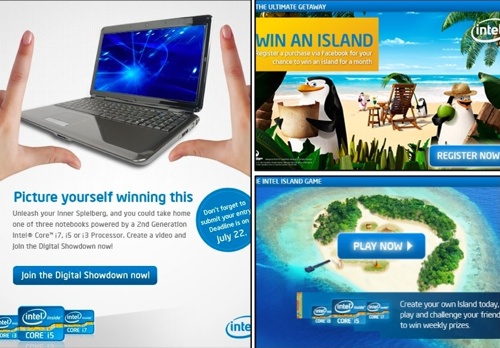
At an exclusive screening event of the movie, Kung Fu Panda 2 (sponsored by Intel), Intel announced their two newest contests.  Companies usually launch one big contest at a time but Intel launched two big ones!

They are Digital Showdown, a digital film-making competition ongoing in Facebook, and Win an Island with 2nd Generation Intel Core Processors, a contest that gives customers a chance to win an all expense-paid escape on a private island.

I immediately read the news release for each of the contests as soon as I got home.  The prizes are so cool!  You see, Intel is giving away 2nd generation Intel core processors powered notebooks and dream holiday trips!  Who wouldn’t want that?

Let me go straight to the details so you can start doing what is needed to get a chance to win!

Digital Showdown

Digital Showdown

To recognize and showcase Filipino creativity and talent, Intel decided to do this digital short film-making contest.  To my fellow countrymen who loves to make home-made videos and upload to social networking sites, this is your chance to show your talent to the whole world and get a chance to win an awesome prize!

All you have to do and know are the following:

    • ‘Like’ the Intel Facebook Page to join.
    • theme of the videos must be based on how the PC makes an impact in your life.
    • videos may either be 30 seconds, 50 seconds or 70 seconds in length.
    • videos may be shot in any format.
    • submissions must be converted into FLV video.
    • files must be no larger than 10MB.
    • you may submit as many original entries, but can only win once.
    • finalists will be chosen by a judging panel appointed by Intel, after which the entries will be uploaded to the Intel Philippines Facebook fan page for voting by Intel fans.
    • to increase chances of winning, Intel also commissioned renowned film directors RA Rivera and Quark Henares to provide mentoring and film-making expert advice on Facebook.
    • Voting will be open for the public for two weeks after the finalists’ submission of entries.
    • The top three shortlisted films with the most number of votes will be the winners.
    • Deadline for entries is on July 22, 2011.

Win an Island with the 2nd Generation Intel Core processors

Win an Island

Now, this is Intel’s way of rewarding their customers.  If you purchase a PC powered by a 2nd Generation Intel Core i5, i7 processor or a boxed 2nd Generation Intel Core i5 or i7 processor from June 15 to August 31, 2011 then you are eligible to join the contest!

And it doesn’t just stop at that.  Even the retailers who sell an eligible 2nd Generation Intel Core i5 or i7 system or boxed processor during the promo period are eligible to win too!

Here’s the information about the Win an Island contest:

    • qualified Intel customers from India, Indonesia, Malaysia, the Philippines, Singapore, Thailand and Vietnam stand to win the grand prize: a month-long island adventure for four on the visually-stunning Joyo Island in Indonesia.
    • Consumers in the Philippines who purchase a PC powered by a 2nd Generation Intel Core i5, i7 processor or a boxed 2nd Generation Intel Core i5 or i7 processor from June 15 to August 31, 2011 are automatically eligible to join.
    • qualified participants must register by SMS with the word “ISLAND” <space> and their email address, and send to 0916-3111566.
    • The grand prize winner will be chosen by a panel of judges at the Intel Asia Pacific Head Office.  One runner-up entry will also be chosen in each country, and will win a one-week stay on Joyo Island.
    • vendors who sell an eligible 2nd Generation Intel Core i5, i7 system or boxed processor during the promo period are also eligible to win a three-night getaway on the private Pom Pom Island, Indonesia.
    • all winners will be notified by an Intel representative, between October 1 and 10, 2011.

The Island Facebook Game

For those who are like me who’s not eligible to join the contest due to various reasons (I’m planning to buy next year), then you can just daydream hahaha!

Intel created this interactive Facebook game called ‘The Island’ which allows players to build and customize their own very private, virtual island with the help of the penguins from Dreamworks’ Madagascar movies.

As we daydream through the Intel Island Game, we might get a chance to win a prize!  Well, as long as we have made the most creative island through the eyes of the Intel representative who will choose a winner weekly.

To all the participants for both Intel contests, good luck! 🙂

Roch Signature

More to Love than Lose in Nexus S

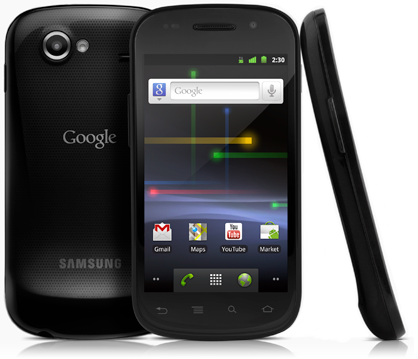
Google Nexus S Phone

Google Nexus S is a promising Android device with a nice set of features such as the noise cancellation software, a 5MP camera, Wifi capability, and more than decent battery life. Being  Google-branded means that it is leverages mostly on Google applications, and will therefore be much appreciated by Google fanboys and fangirls.

Nexus is a brand by Google.  Their first attempt for a Google phone was called the Nexus One, in cooperation with HTC. The phone was moderately successful, but Google decided to partner with Samsung for the second generation Nexus, the Nexus S. The success of the Galaxy S series could have made Samsung the partner of choice for this iteration.

When we say a Google phone, it means that the phone was designed hands on by the Google Android team.  What does this mean?  We get the most out of Google & Android!  Yay!  I was so happy with how fast setup took.  Would you believe it only took me a minute?  I just entered my Google account credentials and the phone is ready to go.  Nexus S is definitely designed for a Google user with built-in applications like Google Mail, Google Calendar, Google Contacts and a lot more.

Aesthetically, Google’s Nexus S is different from Samsung’s Galaxy S series but they do look alike.  It follows Samsung’s shiny, black plastic casing.  A big change from Nexus One’s metal finish. I like the way Nexus S looks even if some might think otherwise.  A lot of consumers think that the black plastic finish doesn’t do the phone justice and makes it look gauche, but  I disagree.  It makes the phone lighter and it complements the big screen of the phone.  At 4.55 ounces and with dimensions of 63mmx123.9mmx10.88mm or no bigger than a ladies’ wallet, you’re sure that you have a portable phone!

I was definitely awed with the big screen and found myself enjoying the browsing experience on this device.  The speed of the device ought to be mentioned too and this most probably be because of the 1 GHz Hummingbird processor that Nexus S has.

Specifications

Google Nexus S 2

  • Quad-band GSM: 850, 900, 1800, 1900
  • Tri-band HSPA: 900, 2100, 1700
  • HSPA type: HSDPA (7.2Mbps) HSUPA (5.76 Mbps)
  • Wi-Fi 802.11 n/b/g
  • Bluetooth 2.1+EDR
  • Near Field Communication (NFC)
  • Assisted GPS (A-GPS)
  • microUSB 2.0
  • 1GHz Cortex A8 (Hummingbird) processor
  • 16GB iNAND flash memory
  • 4.0″ WVGA (480×800)
  • Contour Display with curved glass screen
  • Super AMOLED
  • 235 ppi
  • Capacitive touch sensor
  • Anti-fingerprint display coating

Connectivity

Nexus S’ greatest asset is that it is unlocked.  This gives the consumer freedom to use any SIM card.  Plus, it’s very convenient especially if you travel a lot.  You don’t have to worry and can use any carrier’s SIM card for use.

Another awesome feature is Near Field Communication or NFC. Basically, NFC allows to use the phone in place of a credit card by simply tapping the phone against special sensors in retail stores. This is similar to the G-Pass at MRT stations.  It also allows phones to swap data between each other via 3 methods: read, write, and exchange. Though it won’t have much impact now, it’ll surely be something great in the future.  I’m sure they are still working on the security aspect of NFC but including it is a nice preview into the future!  Can’t wait for this! Once Google gets some support from developers and from business, it’ll surely be a hit!

Nexus S has WiFi, bluetooth and GPS.  I was disappointed with WiFi though.  I tested this one time with Nexus S & another WiFi enabled smartphone side by side using the same WiFi network.  Nexus S only has 1 bar of signal which is very poor while the other smartphone has 3 bars of signal.  This is a deal breaker for me as I’m a huge user of WiFi.

Display

I love how big the display is.  With the 4-inch super AMOLED 480×800 resolution screen, I felt that I don’t need a bigger device for my view preferences.

The contour display is nice too!  The curved glass screen was definitely a welcome change in the Nexus phone!  I heard though that the screen is flat but the glass is curved.  No matter which is flat and which is curved, the design worked and I loved it!

Hardware

Nexus S has a three-axis gyroscope, accelerometer, digital compass, proximity sensor and light sensor.  The light sensor works really well.  It adjusts pretty well under poor light conditions or even extremely bright environment.

When it comes to hardware, the Nexus S is packs a punch with the 1 GHz hummingbird processor.  This definitely is the major reason why the device has great speed performance, being able to handle multiple running apps and background processes.

However, I am concerned about phone memory. It only has 16GB internal memory.  While some may think it’s enough but for heavy smartphone user like me, it definitely is not.  It would be nice if they put an expansion slot for flexibility.  I believe applications alone can quickly fill 16GB memory, how much more media such as music and videos?  It’s also ironic that Google included moving Apps to an external storage in their OS, yet it removed the expansion slot in Nexus S.  I wonder what Google was thinking.


Camera

I’m torn with the camera.  It’s nice that Nexus S has a 5 megapixel back-facing camera but it just feels weird that even though it has a VGA front facing camera. However, Google doesn’t have a native application for video calling.  That’s really why the front-facing camera was implemented right?  Yes, we can use it for self-portrait but being able to do video chat is a big driver for implementing front-facing camera.

Another disappointment I have with Nexus S camera is that it doesn’t have digital zoom.  The flash as well doesn’t have an auto-mode, it’s either on or off.  It’s nice that it has a macro mode though.  Generally, I believe Google & Samsung can improve a lot with Nexus S camera.

Everyone is so hung up on HD video recording.  Too bad Nexus S doesn’t have that feature either.  It only has 720×480 resolution video.  It should be fine but it doesn’t stop there.  All videos are recorded as .3gp format.

Battery

I’ve been using Nexus S heavily for a week.  I had to charge it every night but it didn’t come to a point when I lost battery while I was out.  Hence, I can say that Nexus S has a good battery life.

Official specifications has this to say about the battery life:

Talk time up to 6.7 hours on 3G (14 hours on 2G)

Standby time up to 17.8 days on 3G (29.7 days on 2G)

I also like the battery page in the Google device.  You can see which application is using up most of the battery and some other information.  This is especially useful if you’re still out and will need to conserve battery.

Software

Google Nexus S comes with the newest Android Operating System, version 2.3 called Gingerbread.  The advantage of having a Google-branded phone is you get to experience it first!  Other Android phones will have to wait for a couple of months but Nexus users will have to enjoy it way earlier.

One point worth mentioning is that there is no Android native application for screen capturing. As an iPhone user, I find it very useful to take screencaps of interesting stuff I stumble upon while browsing, and it is a snap to take a screen capture of whatever is on the screen. Unfortunately, this is hard to do with Android. One needs to have experience on software development kits before one can take a simple screenshot, which only takes two buttons on the iPhone. This could be inconsequential for some users, while a deal breaker for others.

3rd Party Software

There are 3rd party software that really stand out in my book.  I love that they created it beautifully in Android OS.

The ones that I liked are Facebook, Foursquare, Angry Birds (it’s FREE!), Plurka, Nesoid Lite & of course, the Google apps.

The one that I dread, on the other hand, is Tweetdeck (geez, it really sucked!).

Summary

Google Nexus S 3

To summarize, here are the pros & cons through my 2 weeks of use:

PROS

  • Google’s noise cancellation software when combined with audio hardware, it results in high quality calls. call recipient hear very little background noise.
  • easy setup.
  • google voice app pre-installed & deeply integrated into the Android OS.
  • gingerbread operating system.
  • drab gray to a black notification bar which helps save battery.
  • on the fly creation of WiFi hotspots.d
  • new keyboard.
  • Google’s navigation and voice input applications.
  • supports VoIP/SIP calling.
  • clean install of Android, pure Google experience, no messy 3rd party software.
  • unlocked – can use different SIM card when in another country
  • screen is crisp & bright
  • phone is very light & feels great in the hand
  • good battery life
  • mobile to cloud, bypasses PC.  No need to sync Android phone with computer.  All mails, calendars & contacts are all working through login with Gmail credentials.

CONS

  • no HSPA+
  • no external storage
  • no HD recording
  • poor wifi
  • no dedicated camera button
  • Market App is not user friendly
  • No native video chat software
  • Media experience is weak
  • lack of notification light
  • camera – no digital zoom function, flash mode has no auto setting
  • camcorder saves in .3gp format, no HD video recording

Overall, I think Nexus S is a great Android device.  If ever, there’ll come a time that I’ll need 2 phones then Nexus S will be my choice as backup.  However, I’m sticking with my iPhone for now.  Android has a long way to go but it definitely is promising!

——————–
This is the initial draft of my article. Final version can be found in Manila Bulletin’s May 16 issue. Also posted in MB’s website.


more to love than lose in Nexus S

Roch Signature

Globe 4G HSPA+ Media Demo Launch

Last wednesday, I took the time to attend Globe‘s media event to demo its new HSPA+ mobile technology.  I was interested as I’m part of the majority of people here in the country who is not satisfied with the speed we’re getting currently from our data subscription.

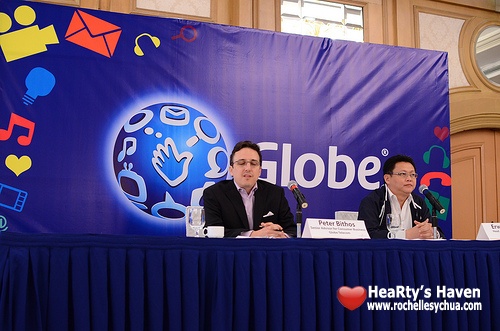
The media event was conducted by Peter Bithos, senior adviser for consumer business and Erwin Roque, head of access technologies.  They shared with us that Globe subscribers can expect improved services with the rollout of its 4G mobile technology.

Global standard HSPA+ or evolved high-speed packet access will be the 1st phase of this exciting 4G mobile technology rollout.

Globe HSPA+ Presentation

Globe executives went on explaining what HSPA+ is, how it works and what the future phases are.

Lastly, they did a demonstration of HSPA+.

Globe HSPA+ Tests with media

Globe HSPA+ Test

They setup different workstations connected to the internet using available mobile broadband services today namely Smart Bro, Sun wireless broadband & their very own Globe Tattoo.  Globe used speedtest.net to test their speeds against each other.  Not surprisingly, Globe HSPA+ won the test.

Here are the results:

Globe Tattoo – DL: 2.55 Mbps, UL: 0.34 Mbps
Smart Bro – DL: 1.12 Mbps, UL: 0.34 Mbps
Sun Broadband Wireless – DL: 0.83 Mbps, UL: 0.09 Mbps
Globe HSPA+ – DL: 7.51 mbps; UL: 1.02 mbps

So what is in store for us?  Since Globe is utilizing HSPA+ for its first phase, current subscribers will already experience improved performance.  It’s not a new technology but an enhancement to the current technology.  You won’t need to buy a new gadget to benefit from this rollout.

As of now, the Globe 4G mobile technology has been deployed in 19 areas in Metro Manila, which covers Marikina, Quezon City, Makati, Pasay, Las Pinas, Taguig & Manila.  More areas will be covered by the end of year 2011.

On May 2011, Globe will offer 4G-enabled devices to allow subscribers to enjoy 4G mobile experience fully.  No details yet as of which devices they are but announcement will come soon.

On a personal note, I had been struggling what 2G, 3G and 4G are.  I’ve been hearing stuff that HSPA+ and LTE aren’t really 4G.  I tried to research and luckily, I have a lot of contacts who are well aware of what they are.  So let me share with you the information that I’ve gotten so you can be enlightened as well 🙂

mobilebroadband

Hope this helps.  I’m really excited that Globe is investing a lot (US $500 million) to be available to provide 4G mobile technology to us.  I can’t wait to see this in full circle.  Time to upgrade my phone and my data subscription too!  Let’s see when! 😀

Roch Signature

HP Unveils New Business Computing Portfolio

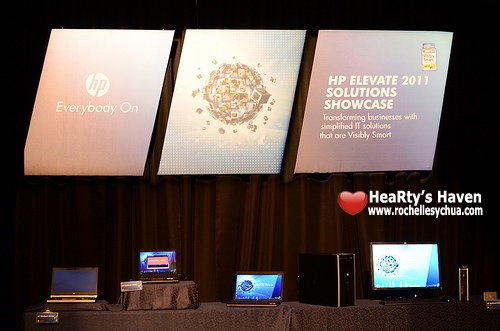
A few days before HP showed us their new Consumer PC lineup, HP unveiled their lineup of business products and solutions specifically targeted to small & medium businesses.  It was a pretty big event I must say.  HP executives were there in full force.  They were ready to show us what the products are and how they work.

HP offers products and solutions to meet the requirements of clients in practically every industry.  During the presentation, they featured several professionals from different fields who are using HP products for their business/profession.  I can relate as in my workplace, we use HP business laptops.

The new business solution lineup addresses the need of the ff.:

  • Mobile professionals who need enhanced system and graphic performance, security & manageability, all with a desktop-like experience.
  • Small to midsize businesses looking for a mainstream, cost-effective business PC.
  • Environmentally conscious customers seeking simple & affordable productivity in client virtualization or cloud computing environments.
  • Educators that need technology-based learning solutions that are scalable and designed with the environment in mind.
  • Creative artists and engineers who require compute-intensive performance and best-in-class displays to bring their ideas to life.
  • Healthcare providers that require powerful, secure & highly reliable systems that help advance simplified patient care.
  • Retailers looking to enhance the customer experience, optimize business efficiencies and improve sales.

The products are definitely created with the entire business in mind.  It’s nice that they do actually have different approach as to how they create products for each target market.

While HP uses MUSE philosophy in their design for consumer products, HP’s business portfolio uses FORGE (form, optimize, richness, guarded & enduring) framework.  Some design highlights from the FORGE framework are precision aluminum-alloy hinges, cast titanium-alloy display latches and HP DisplaySafe frame.

Here are some of the products featured during the event:

HP Z-Series Workstations

HP Z Workstations

Would you believe that the popular kid TV series, Kokey, was actually made using HP Z-series workstations?  It’s true.  ABS-CBN confirmed that they have been using HP Z-series workstations across all their divisions and have been depending on them to perform on critical tasks.

Basically, if you need a powerful PC that boasts advanced memory, graphics and storage then the HP Z-series workstations are for you.  High-performance is definitely a key here.

HP EliteBook 8460p

HP EliteBook 8460p

HP’s top of the line business notebook that features 14-inch display, Intel technology & high-performance graphics.  What really differentiates this model from the rest is its battery life which is up to 32 hours!

HP Multiseat Computing Solution

HP MultiSeat Computing Solution

The HP Digital Learning Suite & Education solutions help schools prepare students for greater success.  One of them is La Purisima Concepcion Academy who has employed the HP Multiseat Computing Solution which is a low-cost innovation that allows schools & organizations of all sizes to setup a complete digital classroom at an affordable price.

With the technology, La Purisima Concepcion Academy in Malabon City was able to provide 432 of their students with higher quality education and a better learning experience.  I wish I can go back in time as technology wasn’t as advanced then.  Lucky are the children indeed in this generation, they have the tools to be more focused on their studies and become more efficient!

HP LCD Digital Signage Displays

HP Digital Signage Displays

I’ve been seeing this technology in the malls.  I then understand what they are upon seeing them in HP’s showcase.  HP’s LCD Digital Signage Displays range from 42 to 47 inches.  They are embedded with HP Media Sign Player technology, enabling plug-and-play convenience for dynamic digital advertising.  Totally cool!

HP Slate

HP Slate

Last, but not the least, the HP Slate.  Unfortunately, this won’t be available in the Asia Pacific Region as it is geared towards businesses (not consumers as we have hoped).  I was able to try out this cute ‘lil gadget and I must say it’s promising.  HP Slate 500 is one of the first tablet to have Windows 7.  This was definitely the star of the event.  I was actually in queue just to be able to try it out.

With the HP lineup for small and medium businesses, we can say that their tagline is definitely real… “Everybody On”.

You can also checkout the lineup for HP Consumer PCs in my previous post.

Roch Signature

HP Showcases New Consumer PCs

I had to attend the HP event last week wherein HP unveiled their new lineup of consumer laptops, desktops and monitors.  In the world of Windows PC, HP is definitely one of the preferred brands.  I was ecstatic to find out how HP redesigned their current lineup of HP Pavilion notebook PC.  I was also excited to see the new HP TouchSmart Consumer PCs.

Here in my workplace, HP is one of the trusted brands.  I’m actually getting a new HP laptop next week as my permanent work laptop.  I do not think I’d be getting one of the products I’ll share with you in this post (as I would be using a business laptop) but knowing that I’d have an HP-branded notebook just makes me feel secured & satisfied.

The new HP Consumer PC portfolio enables users to:

  • experience music the way artists intended it to be heard with Beats Audio, optimized by onboard quad speakers on HP Pavilion dv6.
  • enjoy greater comfort with HP CoolSense Technology, designed and engineered for better cooling on HP dv series.
  • amplify visual euphoria with HP TrueVision HD webcam and the optional graphic enhancement of up to 1GB GDDR5 of dedicated video memory on the HP Pavilion dv4.
  • help protect their personal information and simplify password management, with HP SimplePass on the Pavilion dv6.
  • benefit from the increased range of motion on the HP TouchSmart Consumer PC’s reclining display of up to 60 degrees and forward tilt of up to five degrees.

I was in awe while I was listening to the speakers explain what the new features are of HP’s new consumer PC lineup.  I thought then that it might be too expensive for most of us.  I was glad that they did consider that.  HP offers products that would fit different needs and passion.  Whether you’re a singer, student, advanced user, gamer or photographer, there’s a PC made for you.

The new HP Consumer PC portfolio are built on inspiration from HP’s MUSE design philosophy.  MUSE stands for Materials, Usability, Sensory appeal & Experience.  To further explain what MUSE is about, here’s a simple breakdown:

  • Materials – includes a mix of materials such as metals, alloys and plastics
  • Usability – easy to use features for improved usability
  • Sensory appeal – a blend of artisanal elements for sensory appeal
  • Experience – intuitive features for streamlined experiences

Here are some of the products from HP’s new consumer PC lineup:

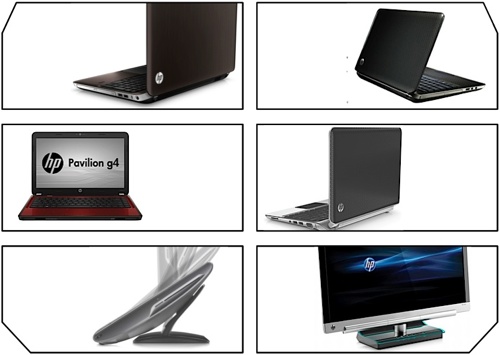
HP Pavilion dv6

HP Pavilion dv6 - a new HP world

On a personal note, I liked this model among all the products showcased that day.  This powerful HP notebook is designed for the performer at heart.  HP Pavilion dv6 has Beats Audio wherein we can enjoy studio-quality music.  Music our favorite artists intended for us to hear.  This awesome laptop even has quad speakers to back it up.  There are 2 speakers both at the front & back.  Wow!

HP Pavilion dv6 also includes HP SimplePass, HP CoolSense Technology and 1GB GDDR5 video memory.

HP Pavilion dv4

HP Pavilion dv4 a new HP world

Are you in it for speed?  Then this laptop is for you.  It maximizes your user experience by providing you full PC functionality with AMD Mobility Radeon HD6750 and 1GB GDDR5 video memory (the fastest graphics enchancement in any notebook PC of its class).  Perfect for people who are after the best multimedia experience in their notebook PCs.

HP Pavilion g-series

HP Pavilion g-series a new HP world

You want a balance of affordability & performance?  Then HP Pavilion g-series shall be your laptop of choice.  It also looks so cool with available colors such as charcoal grey and sonoma red (wicked!!).

Whether you’re updating your status, checking your emails, tweeting your state of mind, watching videos, editing your photos or any other tasks, it’s doable with HP Pavilion g-series.  Security is key too with HP SimplePass & HP ProtectSmart included.

HP Pavilion dm1

HP pavilion dm1 a new HP world

If you’re all about the size and weight of your portable PC, then HP Pavilion dm1 will catch your attention.  It has 11.6-inch HP BrightView HD LED display, 92% full-sized keyboard and a touchpad with dedicated vertical scroll up/down.  It measures less than 0.78-inch thin and has a starting weight of 1.45 kilos.  Battery is decent too with up to 5 hours of battery life.

HP TouchSmart Consumer PC

HP TouchSmart Consumer PC

Ten years ago, we couldn’t even imagine that there will come a time that our PC will have touchscreen.  Now, it’s definitely a reality.  HP has its own version of touch screen with HP TouchSmart.  This new PC offers consumers increased range of motion, superior viewing and an intuitive touch experience with a 23-inch diagonal HD display that reclines up to 60 degrees and tilts forward to up to five degrees.

In addition, the HP TouchSmart Consumer PC has the latest version of HP TouchSmart software which includes:
– touch-optimized applications from Facebook & Twitter
– HP’s exclusive RecipeBox, webcam and music applications where users can add new applications via the TouchSmart App Center
– HP touch-enabled version of Ubisoft’s real-time strategy game, R.U.S.E.
– Beats Audio
– HP LinkUp application for users to wirelessly link a notebook PC to the TouchSmart using a home network.

HP x2301 Micro Thin LED Monitor

HP x2301 Micro Thin LED Monitor

Beautiful is how I describe this 23-inch LED monitor by HP.  You see it features LED backlighting that illuminates the display and edge lit illumination around the screen.  It looks soo cool & stunning!  My gosh!


While HP works hard in providing us with awesome products, they didn’t forget about after sales support.  All the products featured here are backed by HP Total Care, the company’s support program for both in- and out-of-warranty products.  It includes 24/7 access to phone support agents and online support like forums.

Roch Signature

Loading...
X