Author: Rochelle Sy Chua

Adonit Writer Plus for iPad

Adonit Writer Plus for iPad

Glass is not for typing.

That’s the tagline of my newest iPad accessory, Adonit Writer Plus.  And yes, I do agree with the tagline.  While we can type in glass, it’ll take much effort especially if we are trying to type long articles on our iPad.  That’s why Adonit Writer Plus is now something that I bring everyday.

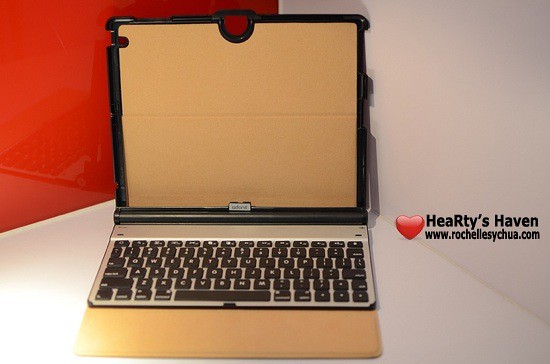
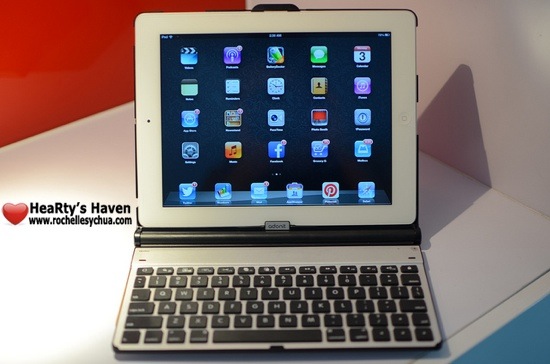
The Writer Plus consists of a Folio case and a Bluetooth Keyboard.  In fact, I blogged about this review on my iPad.  With Writer plus, I can now make more use of my iPad!

WHAT IS IN THE BOX OF THE WRITER?

Oh yes, the beauty of opening the box and the eagerness to take out each component. The excitement to be able to assemble everything and use the accessory ASAP. I just love it!

So here are what’s inside: the Writer (Folio + Bluetooth keyboard), Instruction Manual & USB Charging cable.
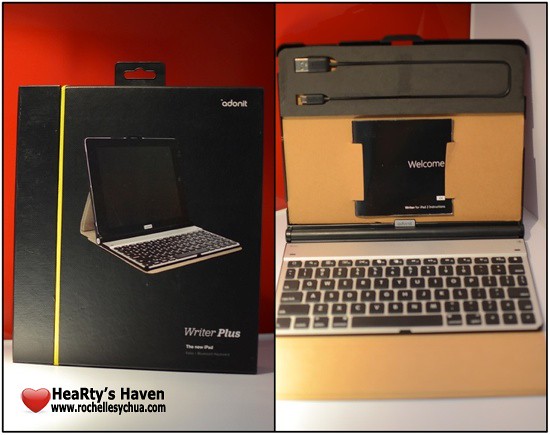
Adonit Writer Plus 12

ANATOMY of the Adonit Writer Plus a.k.a. Writer

The next thing I did was to inspect the Writer.  There are 2 main functions: to protect the iPad through the Folio and to be able to type on a keyboard through the bluetooth keyboard.

When I checked it out, I realised that while the Writer looked simple, each and every little part has a function that made the whole accessory useful.

FOLIO

  • cover – I think there could be a better way to design the outer covering of the writer but it works just fine.
  • protective fabric – inner surface of the writer which means that the iPad is protected inside and out 🙂
  • magnetic closure – the Writer uses the same type of closing mechanism as Apple’s smart cover, a magnetic one!
  • frame – this is where the iPad sits.  It basically holds the iPad together with the Writer.
  • frame cutouts – parts of the frame which have been cut out to give access to the iPad ports and buttons.
  • magnetic plate – I love how the magnet inside the writer can hold the keyboard and iPad to the position that we want them to.

KEYBOARD

  • keyboard – the keyboard and basically why I wanted this accessory in the first place.  And oh, it’s detachable from the Writer!
  • indicator LED – the LED at the top right corner of the keyboard which shows if it’s ready for bluetooth pairing.  It’s also a power indicator, reminding us if we need to recharge the accessory.
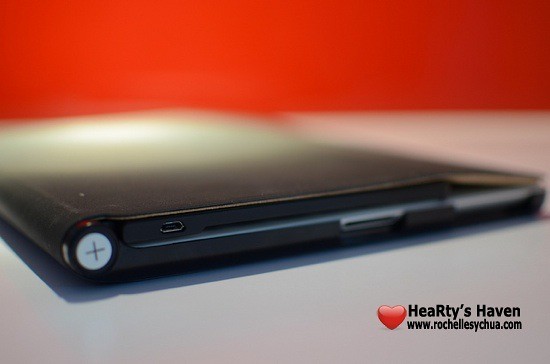
  • micro-usb port – located at the top right side of the keyboard, used for charging.
  • pairing button – button at the top right corner of the keyboard which we press to activate the pairing of the keyboard and iPad.
  • on/off switch – located at the back of the keyboard.  It takes a bit of effort to turn it on using my finger so I ended up just leaving it on.  the battery life works great anyway.
  • rubber bumpers – I do not remove the keyboard from the Writer when I put the iPad on my bag.  That’s why I’m just glad that rubber bumpers on the keyboard protects my iPad screen from any damages.  Super love this part!

Adonit Writer Plus 2

Adonit Writer Plus 3

Adonit Writer Plus 6

INSTALLING THE WRITER

The trick to properly place the iPad to the writer is by inserting the iPad while the accessory is playing flat on a surface.  Next is to ensure that the iPad is aligned with the frame cutouts.

Adonit Writer Plus 9

CONNECTING THE WRITER

Connect the Writer to the iPad by turning on Bluetooth on your device.
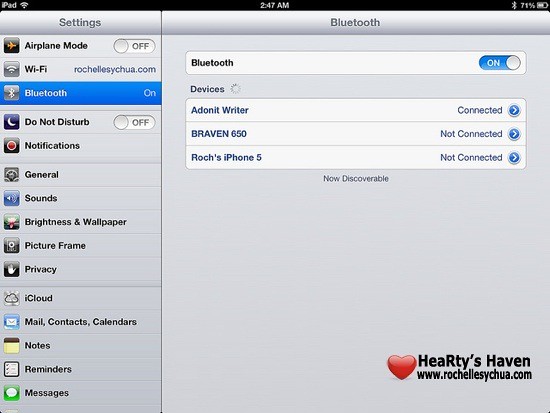
Adonit Writer 1

Once activated on the iPad, you just have to press and hold the pairing button on top right of the keyboard for several seconds. The indicator LED will show a green blinking light and you’re ready to go.
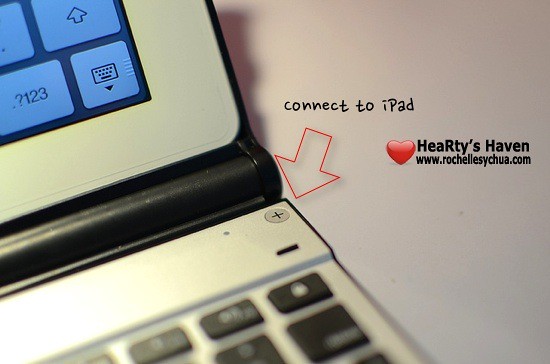
Adonit Writer Plus 7

CHARGING THE WRITER

Once the LED indicator light shows red color, it’s time to recharge the accessory.  You just need to connect the included micro-USB cable into the micro-USB port at the top right side of the Writer.

The battery lasts for 2 weeks with normal use.

Adonit Writer Plus 11

USING THE WRITER

Now, here’s the enjoyable part whenever I get an accessory – to be able to experience its functionalities and features.  I’m really glad that I found this case because I ended up being more productive because I can type on a keyboard! 🙂

Here are some of the features of Adonit Writer Plus for the iPad:

  • Both the keyboard (from a simple pull) and the iPad (through the quick eject) are easy to remove from the Writer.
  • The Magnetic Seal enables the iPad to go to sleep whenever the folio latches on to it.
  • The auto wake & sleep function works not only for the iPad but also for the Writer’s keyboard.  This explains why the keyboard works for a long time without charging.
  • The keyboard wirelessly connect to the iPad via bluetooth.
  • You can put your iPad in any angle because of the magnetic plate that securely places it wherever you want.
  • The protective fabric inside the writer serves as a cushion between the iPad and keyboard.  Other than that, it’s scratch resistant!
  • Adonit Writer Plus doubles as a case just in case you don’t need a keyboard.
  • keyboard – apart from being able to type numbers and letters through the writer, you can also do certain things via special keys at the top part of the keyboard.  Things like going to the Home screen, search window, image gallery, bringing up virtual keyboard, cut/copy/paste functions, control music and sounds and locking the iPad screen.

Apart from all those nifty features, what I ended up with is that I started writing more using my iPad.  I blog more and I use Pages, Numbers and Keynote iOS apps more often.  I tend to start writing my thoughts on my iPad and I’m already contemplating on starting a diary.  In the end, Adonit Writer Plus boosted my productivity.

Adonit Writer Plus 10

Adonit Writer Plus 4

Adonit Writer Plus 5

IN SUMMARY

I super love the Adonit Writer Plus!  It makes writing easier!  With the accessory, I can actually transform my iPad into a full-pledged laptop.  Some of my friends even thought that I was using a compact laptop 😛

PROS:

  • functional detachable keyboard
  • slim & portable
  • rechargeable batteries
  • can double as a case

CONS:

  • folio design could be better
  • on/off switch is difficult to use

The Adonit Writer Plus for iPad is available for Php 4,990.00 in the Philippines.

Roch Signature


How I Use My iPhone, iPad, iPad Mini and iPod Nano

How I Use My iPhone, iPad, iPad Mini and iPod Nano

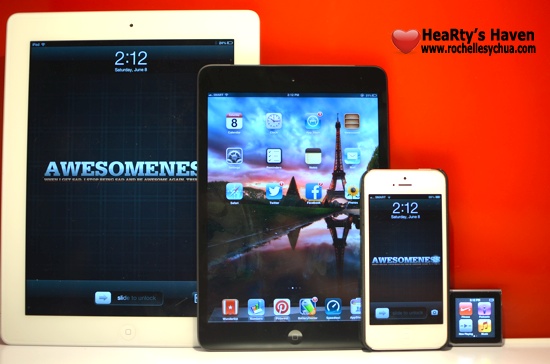
A friend asked me to write about the kind of things I use on my Apple devices.  In all honesty, it took me some time to organize my thoughts on how to make good use out of my iPad Mini, iPad 3, iPod Nano & iPhone 5.

At first, I have the same set of applications on those devices. But then, I realized I should be reassessing the way I use them and be more efficient.

I asked myself these questions, “Why did I purchase the device?”, “What for?”, and “What compelled me to want the gadget?”.

Let me guide you through my thought process when deciding to pin down the main use of each gadget.

Specifications & Unique Features
FIRST, I panned out and compared the specifications and unique features of the Apple-branded gadgets. I put them side by side and tried to analyse them.

Specifications iPhone iPad iPad Mini iPod Nano
storage capacity 32GB 32GB 16GB 16GB
generation 5th gen 3rd gen 1st gen 6th gen
display resolution 1136 x 640 2048 x 1536 1024 x 768 240 x 240
dimensions 4.87 x 2.31 x 0.30 9.50 x 7.31 x 0.37 7.87 x 5.3 x 0.28 1.48 x 1.61 x 0.35
weight 112 grams 652 grams 312 grams 0.74 ounces
camera 8 Megapixels 5 Megapixels 5 Megapixels N/A
unique features
  1. retina display!
  2. LTE-powered
  3. smartphone with cellular & mobile data plan
  1. retina display!!!
  2. huge size that is big enough to watch videos with great satisfaction.
  3. size best suited for keyboard accessory
  1. a tablet that is easier & lighter to carry around.
  2. LTE-powered
  3. perfect size for a tablet and I can hold it in one hand.
  1. with accessories, I can use it as a watch!
  2. perfect companion for exercising.

Uses and Purpose
SECOND, I listed down all the things that I do when using either the iPhone, iPad, iPad Mini or iPod Nano.

  • Reading books, comics & magazines
  • watching videos (movies, YouTube, TV shows & podcasts)
  • listening to music & audio podcasts
  • playing games
  • browsing the net
  • blogging
  • social networking
  • productivity (expense tracking, managing documents, etc)
  • text messaging & phone calls
  • FaceTime with friends
  • check e-mails
  • take notes
  • drawing
  • study online courses
  • managing to-do lists

Roch’s Personal Apple Gadget Usability Chart
LASTLY, after much thought, I decided to map each purpose to the gadgets and here is what I came up:

iPhone iPad iPad Mini iPod Nano
  • text & phone calls
  • FaceTime
  • social networking
  • take photos & videos
  • listen to music
  • use as GPS
  • take quick notes
  • managing to-do lists
  • watch videos
  • read comics & magazines
  • play games
  • take long notes
  • drawing
  • blogging
  • study courses
  • read books
  • Pinterest
  • reading e-mails
  • check out iOS apps
  • browsing the net
  • expense tracking
  • listen to music
  • check time
  • use for exercising

So there, I use each Apple device everyday.  Though, it will make sense to use the same applications on all the devices (since they use the same operating system) and use them to back up each other, I will stick to my plan.  It works for me and I believe I made good use of the features.

How about you?  Do you have multiple devices?  How do you use them?

Roch signature

After Earth Movie Review

After Earth Movie Review

In an attempt to relieve stress, I invited a friend to watch a movie.  However, on the way, we got into a car accident wherein a truck hit my car 🙁  A saddening experience that I do not want to ruin my day for.  So I decided to go through with the plan and end my day watching Will Smith & his son, Jaden Smith on After Earth.

After Earth is the second movie that starred the Smiths.  I wasn’t able to catch Pursuit of Happyness but glad that I didn’t miss to watch After Earth.  I always have a soft spot for father & son/father & daughter movies.  This film definitely fit that genre.

The story came a thousand years after a tragedy made humans escape from the planet Earth.  Nova Prime has become a new home for humans but it’s not completely safe.  An organization called the Ranger Corps are trained to keep humans on Nova Prime safe from the S’krell, a group of aliens that kills humans.

Kitai (Jaden Smith) is a 13-year old son of Ranger Corps General Cypher Raige (Will Smith) who continues to try to prove to his dad that he can be a ranger like him.  In an effort to build a relationship with his son, Cypher tagged Kitai on his last mission before retirement.  However, an asteroid damages their spaceship and they eventually crash-land on earth.  The unfortunate accident kills everyone except Cypher and Kitao Raige.  With Cypher critically injured, Kitai must explore across the dangerous planet to recover their rescue beacon and save his dying father.

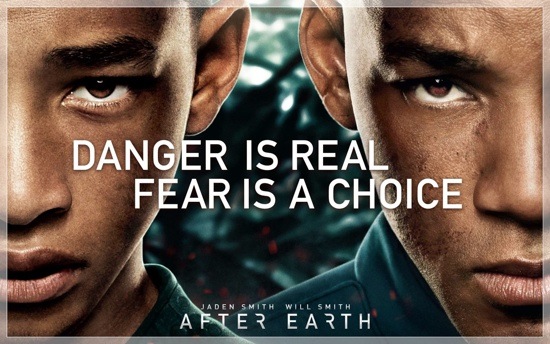
“Fear is not real.  It is a product of the thoughts you create.  Do not misunderstand me, danger is very real.  But fear is a choice.”

If there is something to take away from After Earth, that is to remember that we can choose not to be afraid.  It’s a state of mind and I must say, I’m guilty of such.  We just have to believe & have faith and we’ll eventually gather enough strength to overcome our fears 🙂

After Earth is a very simple film.  Actually there were no twists to the story.  It was straightforward but I love how it was panned out.

Effects are not something I would rave for but it was pretty decent.  I liked the chase with the gorillas and the high tech features of the spaceships.  Other than that, the CGI effects are just alright.

The film is definitely family-oriented.  There were some tender moments wherein I shed some tears.  True love for family specifically father & son relationship was the main theme here.  Will Smith was brilliant!  In spite of his role, you will be able to feel his love for his child.  It was heartwarming!

It was also nice to see how Will Smith took the backseat and let his son, Jaden, carry the whole film.  It’s such an irony considering that Jaden’s character was trying to save Will’s character on After Earth while in real life, Will was just there to help launch Jaden’s career as a box office star following his lead.

My Rating for After Earth: 4 out of 5 stars

Roch Signature

Get your iPad Mini from Smart!

Smart LTE iPad Mini

After being able to experience amazing LTE connection on my iPhone, I must admit that I became dependent on it.  Imagine –> blazing fast speeds!  I couldn’t get over how I can achieve almost 40MBPS!  It was just unbelievable!  Too bad, the free Smart LTE access will only last until June 30, 2013 for my iPhone 5.

But, Smart just released something better!  They introduced two iPad plans that are affordable!  The good news here is…. it includes Smart LTE connectivity (up to 42MBPS speeds FTW!) for 24 months!  You read it right – 24 months or 2 years!

When news broke out 2 weeks ago, I checked out the plans and I must say that they are tempting.  I love how the iPad plans were well-thought of.

The iPad Plan 499 and iPad Plan 999 are both available for iPad 4 and the iPad Mini.  I chose the iPad Mini to test as I already bought the iPad 3 last year.  I realized that the size of iPad Mini is perfect especially for people who are mobile.  It’s 20% thinner and 50% lighter than the regular-sized iPad.  Big difference if you ask me.

Five Reasons Why I Love the new Smart LTE iPad Mini

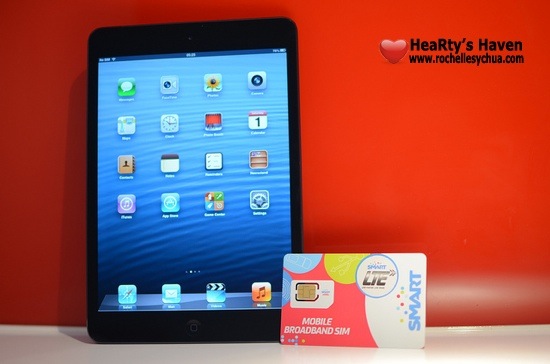
Smart LTE iPad Mini and Smart SIM

Let me countdown 5 reasons why it got my attention:

  1. LTE, LTE & LTE! – Smart has the widest LTE coverage in the country.  I think I’m spoiled in a way that I cannot stand normal DSL speed anymore.  With LTE, one can experience speeds of up to 42Mbps.
  2. Affordable Plans – Plan 499 for 65 hours of connectivity and Plan 999 for unlimited 3G/LTE connectivity.
  3. Big Discounts – You’ll get Php 8,000 discount on iPad Mini if you avail of the iPad Plan 999.  Meanwhile, you can get the iPad Mini at 0% interest for 24 months if you avail of the iPad Plan 499.
  4. Anti-Bill Shock Protection – this one is my favorite benefit from Smart’s iPad plan.  If you’re on iPad Plan 499 and you end up going over the plan limit, you’ll be pleasantly surprised.  Even if you end up using Php 1,500 worth of data connection, Smart will only charge you a maximum of Php 999!  This is perfect for people who are not heavy users of mobile data but can sometimes go over their plan limit occasionally.
  5. Freebies! – you’ll get a neopreene iPad sleeve, discount vouchers of up to 20% on accessories, 2 tickets to digital lifestyle sessons at Smart Jump Center and best priced insurance against theft & accidental loss & damage when you purchase your iPad and iPad plans from Smart.

The Smart LTE iPad Mini Plans

Print

The #GetMini Mania Event

Lastly, if you’re convinced, you might wanna block off time on either June 8 or June 9, 2013.  It’s because Smart is having a #GetMini Mania event this weekend at Shangri-La Mall.

The 2-day event will be about selling discounted iPad Plans!  It’s an event you shouldn’t miss especially if you’re getting an iPad plan powered by Smart LTE.  For Plan 499, you’ll get the iPad Mini at 0% interest for 24 months and for Plan 999?  You’ll get the iPad Mini at Php 9,000 off!  How cool is that?

Smart Getmini Mania June 2013

Get more information at http://www.smart.com.ph/getmini.

Roch Signature

Now You See Me Movie Review

Now You See Me Movie Review

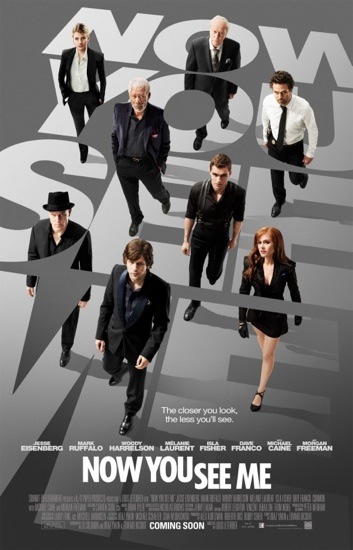
My friend wanted to watch Fast & Furious 6.  However, I watched it already so we ended up checking out Now You See Me.  The poster looked good but what really caught my attention was its plot.  I got to read a short description of the movie while deciding which movie to watch.  I didn’t really have high expectations as Now You See Me wasn’t packaged the same way as movies like Fast & Furious 6, Into Darkness and Hangover 3.

Before I say anything further, I would like to convince you to go catch Now You See Me.  I know reviews online weren’t good.  In all honesty, I think the professional movie reviewers are doing injustice to the filmmaker of Now You See Me.  The film was awesome, exciting, entertaining and unpredictable!  The actors were amazing and perfect for their roles.

If I have to criticise the film, I would say that they should add another hour to build on some characters on Now You See Me.  Otherwise, the 2-hour movie is a must-watch!  Don’t be swayed by the naysayers.  Let you be the judge!

Now You See Me is about the Four Horseman, a group of magicians who rob from corrupt businessmen during their Las Vegas high-tech live shows and give the stolen money to their audiences.  The Four Horsemen aren’t just magicians but they are highly talented individuals with specific specialty.

  • J. Daniel Atlas (Jesse Eisenberg) – a brash magician with motto: the closer you look, the less you see.  He’s arrogant & egotistical cardsharp professional.  He serves as the leader of the group.
  • Henley Reeves (Isla Fisher) – Daniel Atlas’ former assistant turned sexy escape artist & illusionist.
  • Merritt McKinney (Woody Harrelson) – a mentalist who can flesh out secrets of people with specialty in hypnosis.
  • Jack Wilder (Dave Franco) – a street magician who is also a pickpocket, con man and skilled lock picker.

The four magicians are brought together by a mysterious person who offers a reward if they team up and carry out the deception.  Also watching the shows are Arthur Tressler (Michael Caine), an insurance company tycoon who acts as the horsemen sponsor and Thaddeus Bradley (Morgan Freeman), a former magician who now exposes professional illusionists for his own reality TV show.

After the Four Horseman first performance, FBI agent Dylan Rhodes (Mark Ruffalo) and new interpol agent Alma Dray (Mélanie Laurent) started tracking them down.  The chase started from Las Vegas then to New Orleans then to New York.  Will they be able to catch the horsemen?

Now You See Me has an all-star cast and each one of those stars performed perfectly well!  Imagine combining Mark Ruffalo (Avengers), Woody Harrelson (Hunger Games), Jesse Eisenberg (The Social Network), Michael Caine and Morgan Freeman!

Funny to say but I kept imagining the Hulk to come out of the movie.  It’s just hard to separate Mark Ruffalo from his hulk’s character in the Avengers.  Having said that, I must say Mark Ruffalo performed brilliantly again.  He is now becoming one of my favorite actors in Hollywood.  He’s such a believable actor and very funny too without trying so hard!  I enjoyed watching him and would probably watch out for any future films that he will make!

Storywise, I was totally surprised at the ending!  I guess the story went by too fast that it didn’t give me enough time to analyse.  Now You See Me blew me away upon knowing who’s the mastermind and how all the pieces connected together.  I had a great time watching it!

My rating for Now You See Me: 4 out of 5 stars.

Roch Signature

Loading...
X