Author: Rochelle Sy Chua

Man of Tai Chi Movie Review

Man of Tai Chi

It’s so fun to watch a movie when you are a big group!  We consumed 1.5 rows of the movie theatre and we even hanged out just to discuss what we thought of the movie afterwards.  It was just full of fun, fun, and fun!

Everyone voted for Man of Tai Chi when there were bigger movies showing in the cinemas.  The consensus is that people tend to want to watch those blockbuster movies with their special someone and leave the not-so-popular movies for night outs with colleagues.  You know what?  Man of Tai Chi turned out to be a very entertaining movie that we ended up enjoying a whole bunch of it.

We also had our picture taken of us having a tai chi pose.  The bonding was that successful and we all enjoyed the night, the company and yes, the movie 🙂

Man of Tai Chi Group
Photo by my colleagues Carlos & Anna

Spoiler alert!

Man of Tai Chi is the story of Tiger Chen, a Tai Chi student.  He works as a courier by day, learns english on his way to work by listening to the radio and lives a very simple life.  In his off hours, he meets with his Tai Master from Lingkong School of Tai Chi in a 600-year old temple to further hone his Tai Chi skills.  Like superhero.

Tiger joins a martial arts competition to show the world that Tai Chi is not being used just for exercise.  During that competition, he’s discovered by Donaka (Keanu Reeves) and lures Tiger to join his underground fight club as a fighter.  Tiger Chen initially rejects Donaka’s offer but was forced to participate due to an urgent need of cash to save the Tai Chi temple that his master has guarded for years.  As Tiger continues to join the illegal fights, the killer instinct in him is released.  Will he be able to control it?

Man of Tai Chi Still

Overall, I really liked the film.  I guess I went inside not having any expectations apart from seeing Keanu in the screen again after a very long time.  If you’re someone who analyses films that you watch and wants to further understand each major character’s story then you’ll be disappointed.

Man of Tai Chi is a very simple film.  Actually, I think it’s a collection of different fighting techniques which most martial arts fans would love.  If you love action, wresting and martial arts, then you will definitely love Man of Tai Chi because 80% of the film is all action, action & action!

For girls who swoon on Keanu Reeves, you won’t be disappointed!  He didn’t change at all!  In fact, if there is someone who mastered the fountain of youth, Keanu must be it!  Boy, he didn’t age at all.  Upon watching the film, I was actually laughing my heart out because in spite of several punches to his face, he didn’t seem to have any scars, blood or anything, it’s like his face is insured or something.  It was really funny!  You’ll notice it when you get to watch Man of Tai Chi.  But of course, this is not new to anyone, Keanu still has the same emotionless expression 😛

This is Keanu’s directorial debut.  While lacking in plot, I believe Man of Tai Chi is a decent film to watch.  It’s good to know that Keanu made the movie in honor of Tiger Chen (coincidentally same name as the film character) after having worked with him in the Matrix franchise.  Tiger was Keanu Reeves’ trainer and was mostly responsible for the stunts in movies like Matrix and Kill Bill.

As a bonus (at least for me), I’m very happy to see my favourite Chinese stars acting on the big screen (i.e., Karen Mok and Simon Yam).

My Rating for Man of Tai Chi: 3.5 out of 5 stars

Roch Signature

Recipe: Corn Ice Candy

Corn Ice Candy

Whenever I’m in the mall, my biggest weakness is to see home appliances and accessories.  In one of those shopping trips, I was able to buy ice candy molds.  They’re cute and I couldn’t wait to try them out.  I searched around the web for an easy ice drop recipe.

The only thing I needed to do is to mix all the ingredients, put them in the mold, freeze them overnight and then, I can already enjoy my very own ice drop!  The best thing about this recipe and why I chose this among all the other similar recipes is that the main ingredient is corn.  Corn is one of my ultimate favourites.  Being able to try out corn in a different way is cool! Read More

Case-Mate is now in the Philippines!

Case-Mate Philippines

You might have noticed that I make it a point to get myself a case for every gadget that I purchase.  Considering the cost of those electronic gadgets, it makes a lot of sense to buy a case that would protect them for normal wear and tear.  It would prolong the life of the gadget and of course, gives us a sense of security that our beloved gadget is protected.

There a lot of well known brands that makes good cases.  One of them is Case-Mate.  And you know what?  The best news?  Case-Mate is now in the Philippines!

Case-Mate will have a grand launch of the brand, as well as the opening of its first kiosk!  The big celebration will be between July 19-21, 2013.

So you don’t need to order overseas anymore if you love Case-Mate!  You can go ahead and visit its first concept kiosk located at the 4th floor Cyberzone, SM Annex, SM City North Edsa in Quezon City.

Case-Mate Kiosk

Case-mate crafted (take note of the word craft, Case-mate consider themselves crafting cases and not making cases) different lines of cases that caters to a specific lifestyle.  Apart from that, Case-mate has partnered with popular gadget manufacturers to ensure that Case-mate products are fit for each device.  Those brands include HTC, Apple, Samsung, Sony & Blackberry.

  • Glam series for the female fashionistas that can dazzle and sparkle day or night.
  • Creatures collection for the young and playful, nothing looks more cute and adorable.
  • Men’s collection evoke a look of modern and natural sophistication.
  • Brushed Aluminum series impress with a blend of metallic, sporty look and sleek luxurious feel.
  • Woods series to be as exotic and distinct as the premium hardwood which goes into every Case-mate cases.
  • Carbon Fiber series to create handsome aesthetics and complement your high-performance automobiles with the technologically advanced lightweight fibers used by Formula One race cars and luxury automobiles.
  • Tough series collection for the ones that live in an active lifestyle.

Starting July 19, consumers can now see and try the vast selection of Cast-Mate cases for their gadgets.  There will be promos from Case-mate from time to time.  In fact, to celebrate the opening of Case-Mate in the Philippines, selected cases will be at 80% off from July 19-21, 2013!

Case Mate Sale

Cool news, right? 🙂

Roch Signature

Urbanears Slussen

Urbanears Slussen

I discovered Slussen via Facebook when someone posted a photo of it.  I immediately said to myself that I want one!  It is a unique accessory and I must say a needed one for a gadget freak like me.

This small gadget accessory is as simple as you get.  It is a 2-piece item.  There’s a keyring, and an adapter that you plug into your iOS device.  But don’t let its size diminish its functionality.  The Urbanears Slussen is fierce, super fierce!  This little thing coupled with its free iOS companion software can transform any place into a fun party!

How? Read on.

Headphone Splitter

Urbanears Slussen 5

Urbanears Slussen 3

I initially got myself the Slussen because I felt the need to have this accessory so that when I go on a trip with a friend, I will be able to share the music I’m listening to.

You know being able to listen to music with both earphones on really makes a difference versus listening with just one ear.  Having both me and a friend making the most out of our headphones or earphones is really the reason why we have those accessories.  The Slussen by Urbanears made it possible and I love it!

This functionality alone made me think that purchasing Urbanears Slussen is worth it.  However, upon reading the manual, I was totally shocked that Slussen was actually made for the DJ in us…

Pocket-sized DJ Kit

I’ve always thought that I have ZERO talent for DJing.  Whenever I’m in a party, I would just look at the DJ from afar thinking that I would never ever be able to try out how to mix sounds and especially, scratching them.  Besides, I don’t have the equipment.  This year, that impossibility became a possibility!  How did that ever happen?

Technology really advances fast that even DJing is a possibility now for newbie like me.  Thanks to Urbanears Slussen, my headphones and speaker, I now spent a couple of days mixing and experimenting music.  I’m enjoying it sooo much!

So here’s how it works:

  1. Download the Slussen iOS application from the app store.
  2. Connect the slussen adapter to your iPhone.
  3. Plug your speaker and headphones to your slussen adapter.
  4. Launch the Slussen iOS application and you’re on your way to DJ awesomeness!
Slussen iOS
Slussen app

In just one glance of the Slussen iOS application, you can already see the different controls.  The first thing I did was load the tracks in each of the deck. I chose two of my favorite songs today.  When I played the songs, they really didn’t match.  I had to read some tutorials on how I can mix music.  It’s definitely not easy. I’m just glad that Urbanears had thought about this great app and accessory so that at least I can experience DJing (even just for my own enjoyment, hehe!).

Slussen’s Controls

  • kill all – kill the EQ effects on the respective side
  • 125 BPM – increase the BPM of a track or change the pitch by tapping the BPM button
  • sync button – press this button to make sure that 2 different tracks are played in perfect sync
  • equalizer – press and hold the EQ button to adjust the equalizer or gain.
  • scratch function – press and move any of the decks while they are playing to scratch
  • crossfader – slide from right to left to choose which side should be heard in your speakers
  • headphone crossfader – lets you choose which deck you will hear in your headphones
  • cue feature – cue instantly, or set a new cute-point by tapping the cue button

What I appreciate in this application is how you can mix two different tracks and control where the music will come out.  You use the crossfaders to control the music that will come out in your speaker or headphones.  There’s the sync button to make the two tracks in sync (this is especially helpful if I suddenly got tired of harmonizing them).  Of course, the scratch function is a joy to play with!

The best feature of it all is pre-listening!  You can prepare your next music mix on your headphone without affecting the sounds coming out of the speaker.  Then when ready, you load the next track to mix for everyone to listen.

In the future, I hope that Urbanears would add a feature wherein we can record our own music mixes.

Keychain

Lastly, how else can we bring Urbanears Slussen with us but hanging on our keychain?  It’s easy to pull it up when we need the Slussen, whenever, wherever, and always 🙂

More Information?

Still want to know more about Urbanears Slussen?  Then watch the video from Urbanears below.

Availability

Urbanears Slussen 4

Urbanears Slussen 1

Urbanears Slussen is available in four colors [Tomato (red), Grape (purple), Petrol (blue) & Pumpkin (orange)] and is priced at Php 795 in the Philippines.

Roch Signature

20 Things I Love about iOS 7

20 Things I Love about iOS 7

I’ve been dying to experience iOS 7 ever since it was announced early this week.  Apple completely did an overhaul and made a lot of improvements to iOS 6.  As expected, iOS 7 will only be available for developers as of now and will be released to the public this fall (around September timing).

Considering how I adore Apple, I couldn’t take it any longer that I got myself a developer account.  I downloaded the beta version of iOS and started checking out the features of the upcoming iOS.

Here are 20 things that I love about iOS 7:
I know there are hundreds of features which I still have yet to try out.  However, for now, these are the things that I immediately noticed upon exploring my iPhone 5 with iOS 7.  One word to describe the experience: WOW! 🙂

  1. New Design

rochellesychua.com

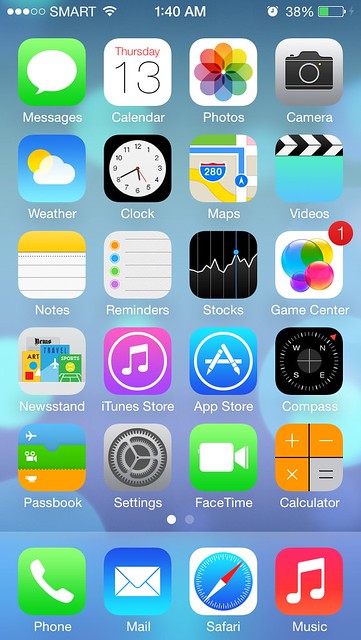
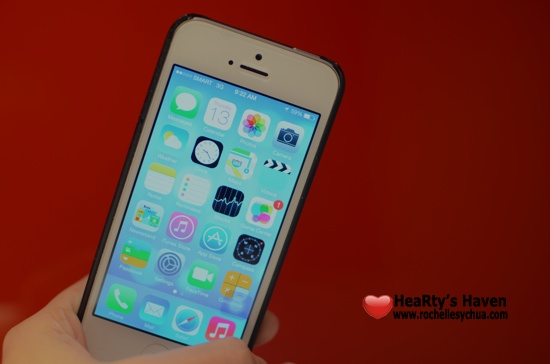
With Jonathan Ive on board, I knew that the design of iOS will change drastically… for the better!  I knew that finally the design will complement both the operating system and hardware.  Everything was changed: the icons, the home screen, the screen space, the dock and even the signal bar (from bars to dots).

Skeumorphism is definitely out and flatness is in.  Skeumorphism is where things resembles an actual product.  If you loved the yellow notepad and leather bound calendar, you won’t see it in iOS7 anymore.  I do not miss them one bit because I love the cleanliness and the simplicity of the new icons!  There’s not much noise anymore.

The new look makes the iPhone look more elegant.  Just the way it’s supposed to be 🙂

  1. iMessage

rochellesychua.com

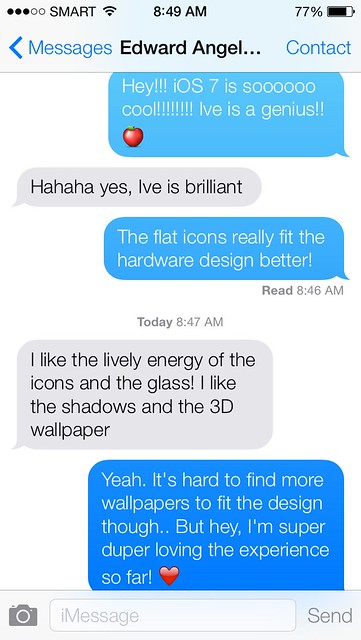
The Messages app also had a makeover and boy, I do love it to bits!  Just like the home screen, this is definitely a lot cleaner!  Jonathan Ive removed clutter in the app.  I immediately noticed this.  The profile image of the individual isn’t visible anymore inside the message window.

  1. Lockscreen

rochellesychua.com

I tend to choose the shortest time possible to auto-lock my iPhone.  The reason is that I want to save battery.  Sometimes, I find it irritating if I only want to open the flashlight app or to take a quick picture because I have to click several tabs before I can access them.

Luckily, with iOS7, we now have the ability to access control center from the lock screen.  Net, it’s easier to access flashlight, clock app, music, airdrop, calculator, brightness option and several other features!  Sooooooo awesome!

  1. Game Center

rochellesychua.com

No more green felt in the Game Center because it’s now a sleek white screen with colorful bubbles!  It’s interactive too!

  1. Camera App

rochellesychua.com

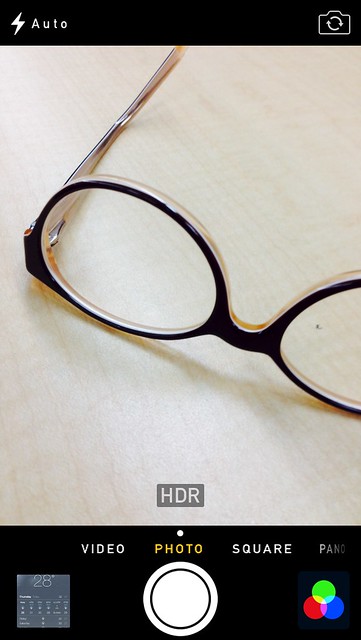
The Camera application was redesigned completely.  It’s now easier to access the different modes: Video, Photo, Square (new) & Panorama by a swipe of a finger.  The Square mode is there for people who prefers square pictures over portrait.

  1. Filters

rochellesychua.com

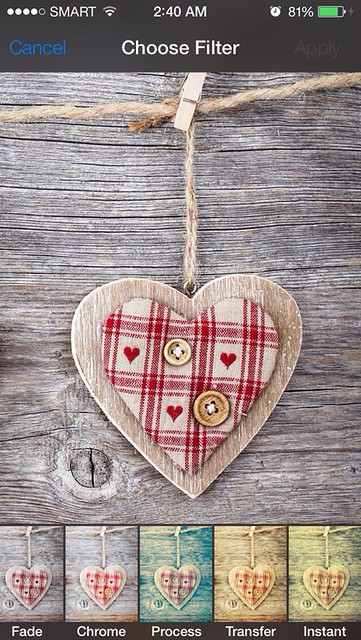
It’s time to say goodbye to some filtering applications because iOS 7 now has built-in camera filters!  There are eight filters to choose from, just enough for us to have cutesy creative photos.

  1. Photo Gallery

rochellesychua.com

One improvement area of iOS6 is the way photos are organized.  If I have thousands of pictures on my iPhone, I need to scroll through a very very long page in order to view them.  With iOS 7, our photos are now organized into a timeline – years, months, weeks, and days.  No need to manually arrange our photos!

  1. Siri

rochellesychua.com

It’s easier to tell if Siri is listening as audio waves are now shown when Siri is listening and analyzing what we are saying.

In iOS7, Siri works with Bing (no surprise there as Google is clearly a competitor)!  Apart from that, Siri also gets information from Twitter and Wikipedia to answer our queries.

  1. Apps Near Me

rochellesychua.com

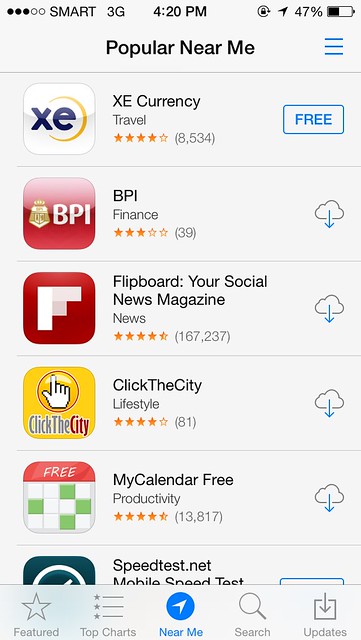
In app store, we can find applications that are popular near our current location.  So when we travel, this little feature would help guide us on what to download right at that moment.  In my case, when I did a search earlier, I discovered the XE currency app which is totally new to me!  Very useful!

  1. Weather

rochellesychua.com

Animation just made the Weather app ten times cooler!  I was driving earlier going to work and I was impressed with how the sky and the weather app looked the same!  It was like a carbon copy of sorts and that made me want to use the application more because of this new change!

  1. Notification Center

rochellesychua.com

The notification center have been redesigned in a way that it now has 3 tabs (today, all & missed).

Today tab – gives us a rundown of our events & stock prices for the day.
All tab – a combination of everything (messages, twitter, facebook, emails, etc) that are activated in your notification settings.
Missed tab – where we can find a list of our missed calls.

  1. Multi-tasking

rochellesychua.com

Vast improvement on multi-tasking.

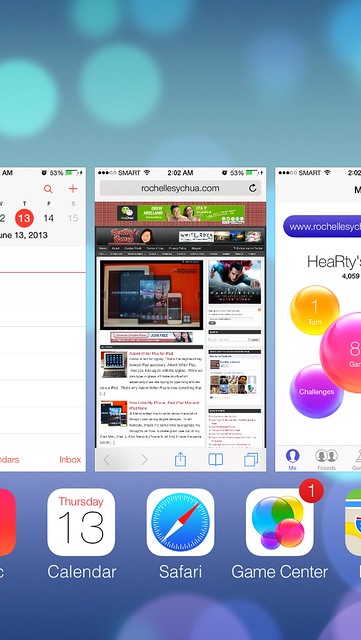
I believe that this time Apple fixed this feature right.  Finally, when we double tap the home button, we can now see a preview of all our running applications.  It’s easy to browse through them now and we can quickly close an application by swiping it up.  The best improvement on this is that we don’t have to wait for the applications to be updated when we switch to them as iOS automatically updates them on the background.  Super cool, isn’t it?

  1. Mail

rochellesychua.com

iOS 7 is definitely about simplicity and elegance.  We can see that clearly through the new email application.  It’s as simple as swiping to the right to access mailboxes and folders then swiping to the left to archive an email.  Simple but it works!

  1. iTunes Radio

rochellesychua.com

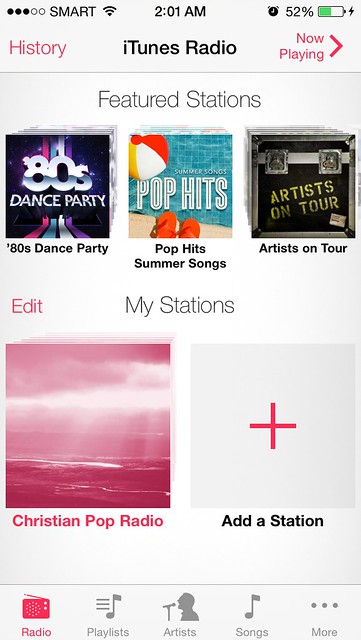
We can now listen to music for free with iTunes Radio!  All we have to do is open the music app, click Radio and choose the stations we like.  We can them stream the music from the internet!  If we like the track we’re listening to, we can buy it right there and there!

  1. Full Screen Safari

rochellesychua.com

Another welcome improvement to iOS is the full screen Safari.  The elements will be automatically hidden/minimized until we need them.  With that, we can maximize the use of the beautiful retina display of iPhone 5.  Very well thought of Apple!

  1. Safari Tabbed Browsing

rochellesychua.com

Tabbed browsing is a great improvement to the overall look of Safari.  It’s easier to browse from page to page with this format.  Five tabs can be shown on iPhone screen at once glance.

  1. Shared Links

rochellesychua.com

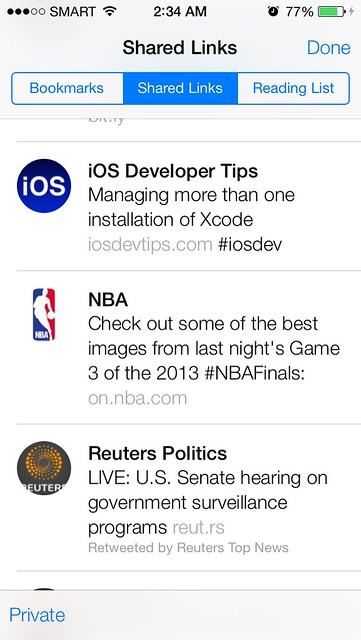
Another Safari on iOS 7 feature that I love is the addition of shared links from Twitter.  I follow a lot of technology, NBA, and news journalists on Twitter thus I read a lot of articles from there.  I’m glad it’s now way easier to access those shared links.

  1. AirDrop

rochellesychua.com

I was laughing when the Apple keynote speaker said that we don’t have to run around bumping phones anymore.  He was talking about AirDrop and I must say, FINALLY!

I wasn’t able to test this as I do not know anyone with iOS7.  AirDrop uses Wi-Fi and Bluetooth to share files (photos, contacts, videos) with anyone who is nearby.  With AirDrop, transferring data is now much easier!

  1. Search Anywhere

rochellesychua.com

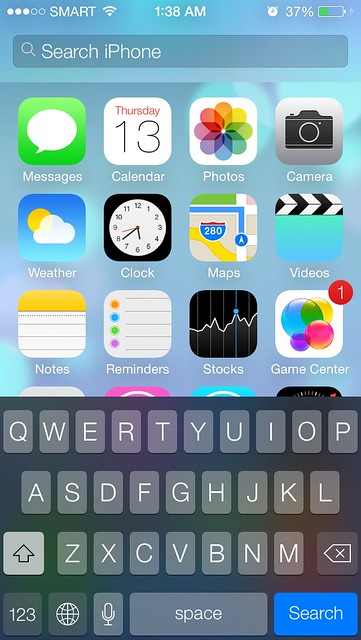
In the past, whenever we need to search something on our iPhone, we have to press the home button then swipe to the right.  Considering that I use this feature a lot, I would wish that I can do this in a faster way.

My wish has been answered because iOS 7 has brought a new way to access spotlight search!  We just need to swipe down from anywhere on the screen to bring up spotlight search!  One watchout is that we can’t do this at the absolute top because it is where the notification center is.

  1. Control Center

rochellesychua.com

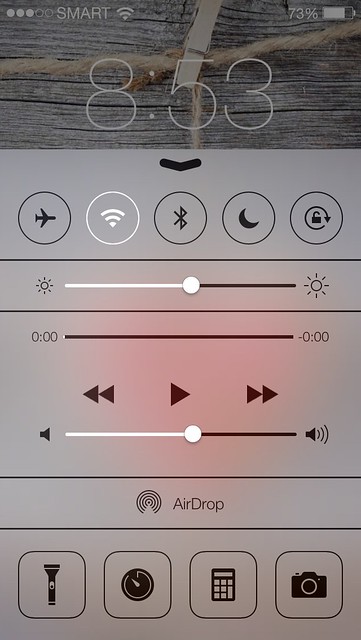
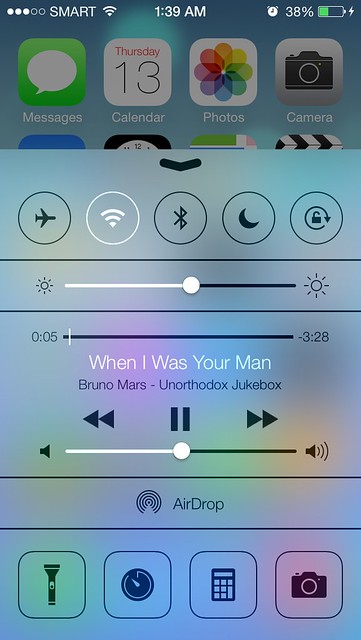
The control center has got to be my favorite among all the new features of iOS7.  It’s extremely useful!  The control center gives us control over airplane mode, wifi, bluetooth, DND mode, lock screen, screen brightness, systems volume, music playback controls, airdrop, flashlight, clock, calculator and camera!  Whew, that’s a lot!

All those features used to be inside the settings app or a separate application thus we have to enter the home screen and click a few times on the screen in order to access them.  But now, we can access all those features simply by swiping up on the screen!

This is probably something that would stop people from jailbreaking their iPhone.  Most of the features that they gravely find on iOS are now coming with iOS7!

The iOS 7 that I have on my iPhone 5 is still beta 1 version so I expect a lot of bugs.  I can’t wait for September so that everyone can experience the brilliantness of the revamped mobile operating system of Apple.  Great Job Ive and team!

Roch Signature

Loading...
X