Most of us gadget freaks who are based in Manila must have lacked some sleep yesterday. This was because Apple’s Worldwide Developers Conference (WWDC) was held 1-3AM Manila time early Tuesday morning. So many people, including myself, just wanted to know exactly the new great things that Apple would show us. There were a lot of things that were expected but then the event ended up being solely about our beloved iPhone.
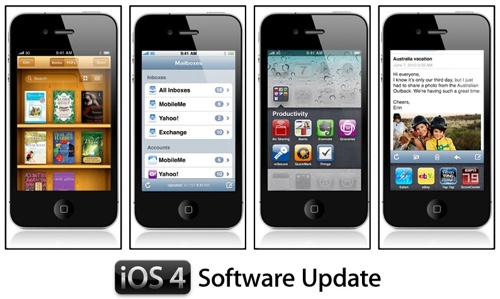
I own 2 iPhone units, the 1st generation iPhone & iPhone 3GS. Steve Jobs presented the new iPhone 4. As much as I want to have one, I’ll stick with my 3GS. What I’m really excited about is the iPhone software update called iOS 4.
Here are 5 reasons why I’m so excited to download the new iPhone OS when it comes out this month:
- Multi-tasking
This just shows that Apple is listening to us. We have been complaining for 2 years that we wanted to be able to switch between applications. We thought it would never happen but then, finally here it is! Apple is just making sure that when they do that, it would be perfect. They assured us that with this capability, application & battery performance won’t be compromised. I’ve been using Skype heavily on my iPhone. It has always been a challenge whenever I receive a text message while in a Skype call. I can’t read text messages & when I accidentally press read, my Skype call would automatically be cut off. I’ve been wishing for this to be fixed. Plus, I would like to be able to read text messages, read emails or even surf the net while using Skype. iOS 4 fixes that personal need of mine. I’m so happy! Can’t wait to download the updated OS. Please let time fly fast. I need it now, please? - Folders
The page limit in the iPhone is such a pain for iPhone addicts like me. With thousands of awesome applications available for the iPhone, we can’t access them all in our phone. I have to either perform a jailbreak on my iPhone or just choose my favorite apps to keep on my phone and let the rest be in my iTunes application folder.
Another reason why I so want this feature is because I’m a bit OCD (Obsessive Compulsive). I want my iPhone screen to be clean. I would really love to organize all games into one folder, all productivity applications in one folder, all social networking apps into another and so on.. This is a must-have for me! Finally, I don’t need to go through the tedious task of jailbreaking my iPhone. - iBooks
Ever since the iPad came out, I have been wishing that iPhone would have iBooks as an application too. Wow, Steve Jobs must have heard me (don’t know how though hehehe!). I used to spend thousands of pesos buying books every year. I stopped buying a few years ago and ended up just downloading eBooks instead then I ventured into audiobooks. With iBooks though, being such an eyecandy, it seems Apple is really trying to bring the convenience of reading eBooks to all its loyal customers and fanbase. With colored screen, you can just use your finger to flip through pages, awesome bookshelf design, I have found the solution that I have always wanted! Instead of keeping all my books in the shelves or tirelessly trying to find better audiobooks or ebooks, we now have iBooks! A one-stop shop to look for books & have the ability to bring all of them on your phone? It’s just wow! - Improved Mail
I have several mail accounts although my official email is my yahoo. With the current iPhone software, we have to organize our emails separately by account. With the improved mail in iOS 4, we can now see all our emails in just one screen and have the ability and the option to organize them and treat as one! Apple is just pure genius! - Home Screen Wallpaper
Another wish came true for me. Not being able to change the background image of our screen is just plain boring. I would probably change it every chance I get, and would want it to match with my current mood. Great that we can do that soon with our iPhones! One more wish that I hope will come true are themes! Be able to change the application icons and match it with the background image. Will it come true? Let’s see, maybe for iOS 5?
The 5 things I mentioned are not the only ones we should expect with Apple’s iOS 4. There are more improvements & updates such as being able to create playlists on our own iPhone, 5x camera zoom (sweet!), video focus, faces & places in photo (it’s not exclusive to iPhoto anymore!), spellcheck, wireless keyboard support & the ability to give apps as gifts to friends/family.
I wish time would really move faster, I really want those features ASAP on my iPhone! It’s sad that it won’t have an effect on my 1st generation iPhone but at least I still have iPhone 3GS! 😀 Better things ahead for us iPhone users!
Now let’s recite: We LOVE Apple products! 😀