Category: Technology

How I Use My iPhone, iPad, iPad Mini and iPod Nano

How I Use My iPhone, iPad, iPad Mini and iPod Nano

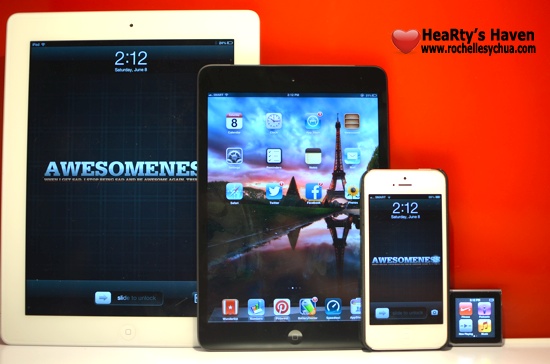
A friend asked me to write about the kind of things I use on my Apple devices.  In all honesty, it took me some time to organize my thoughts on how to make good use out of my iPad Mini, iPad 3, iPod Nano & iPhone 5.

At first, I have the same set of applications on those devices. But then, I realized I should be reassessing the way I use them and be more efficient.

I asked myself these questions, “Why did I purchase the device?”, “What for?”, and “What compelled me to want the gadget?”.

Let me guide you through my thought process when deciding to pin down the main use of each gadget.

Specifications & Unique Features
FIRST, I panned out and compared the specifications and unique features of the Apple-branded gadgets. I put them side by side and tried to analyse them.

Specifications iPhone iPad iPad Mini iPod Nano
storage capacity 32GB 32GB 16GB 16GB
generation 5th gen 3rd gen 1st gen 6th gen
display resolution 1136 x 640 2048 x 1536 1024 x 768 240 x 240
dimensions 4.87 x 2.31 x 0.30 9.50 x 7.31 x 0.37 7.87 x 5.3 x 0.28 1.48 x 1.61 x 0.35
weight 112 grams 652 grams 312 grams 0.74 ounces
camera 8 Megapixels 5 Megapixels 5 Megapixels N/A
unique features
  1. retina display!
  2. LTE-powered
  3. smartphone with cellular & mobile data plan
  1. retina display!!!
  2. huge size that is big enough to watch videos with great satisfaction.
  3. size best suited for keyboard accessory
  1. a tablet that is easier & lighter to carry around.
  2. LTE-powered
  3. perfect size for a tablet and I can hold it in one hand.
  1. with accessories, I can use it as a watch!
  2. perfect companion for exercising.

Uses and Purpose
SECOND, I listed down all the things that I do when using either the iPhone, iPad, iPad Mini or iPod Nano.

  • Reading books, comics & magazines
  • watching videos (movies, YouTube, TV shows & podcasts)
  • listening to music & audio podcasts
  • playing games
  • browsing the net
  • blogging
  • social networking
  • productivity (expense tracking, managing documents, etc)
  • text messaging & phone calls
  • FaceTime with friends
  • check e-mails
  • take notes
  • drawing
  • study online courses
  • managing to-do lists

Roch’s Personal Apple Gadget Usability Chart
LASTLY, after much thought, I decided to map each purpose to the gadgets and here is what I came up:

iPhone iPad iPad Mini iPod Nano
  • text & phone calls
  • FaceTime
  • social networking
  • take photos & videos
  • listen to music
  • use as GPS
  • take quick notes
  • managing to-do lists
  • watch videos
  • read comics & magazines
  • play games
  • take long notes
  • drawing
  • blogging
  • study courses
  • read books
  • Pinterest
  • reading e-mails
  • check out iOS apps
  • browsing the net
  • expense tracking
  • listen to music
  • check time
  • use for exercising

So there, I use each Apple device everyday.  Though, it will make sense to use the same applications on all the devices (since they use the same operating system) and use them to back up each other, I will stick to my plan.  It works for me and I believe I made good use of the features.

How about you?  Do you have multiple devices?  How do you use them?

Roch signature

Get your iPad Mini from Smart!

Smart LTE iPad Mini

After being able to experience amazing LTE connection on my iPhone, I must admit that I became dependent on it.  Imagine –> blazing fast speeds!  I couldn’t get over how I can achieve almost 40MBPS!  It was just unbelievable!  Too bad, the free Smart LTE access will only last until June 30, 2013 for my iPhone 5.

But, Smart just released something better!  They introduced two iPad plans that are affordable!  The good news here is…. it includes Smart LTE connectivity (up to 42MBPS speeds FTW!) for 24 months!  You read it right – 24 months or 2 years!

When news broke out 2 weeks ago, I checked out the plans and I must say that they are tempting.  I love how the iPad plans were well-thought of.

The iPad Plan 499 and iPad Plan 999 are both available for iPad 4 and the iPad Mini.  I chose the iPad Mini to test as I already bought the iPad 3 last year.  I realized that the size of iPad Mini is perfect especially for people who are mobile.  It’s 20% thinner and 50% lighter than the regular-sized iPad.  Big difference if you ask me.

Five Reasons Why I Love the new Smart LTE iPad Mini

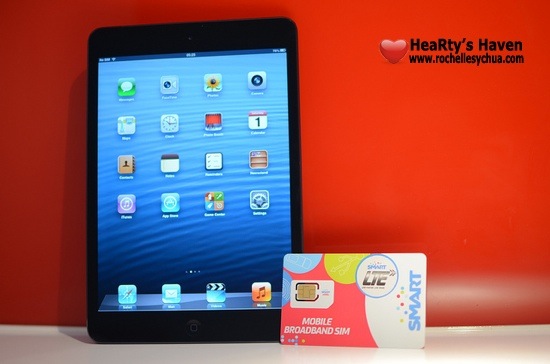
Smart LTE iPad Mini and Smart SIM

Let me countdown 5 reasons why it got my attention:

  1. LTE, LTE & LTE! – Smart has the widest LTE coverage in the country.  I think I’m spoiled in a way that I cannot stand normal DSL speed anymore.  With LTE, one can experience speeds of up to 42Mbps.
  2. Affordable Plans – Plan 499 for 65 hours of connectivity and Plan 999 for unlimited 3G/LTE connectivity.
  3. Big Discounts – You’ll get Php 8,000 discount on iPad Mini if you avail of the iPad Plan 999.  Meanwhile, you can get the iPad Mini at 0% interest for 24 months if you avail of the iPad Plan 499.
  4. Anti-Bill Shock Protection – this one is my favorite benefit from Smart’s iPad plan.  If you’re on iPad Plan 499 and you end up going over the plan limit, you’ll be pleasantly surprised.  Even if you end up using Php 1,500 worth of data connection, Smart will only charge you a maximum of Php 999!  This is perfect for people who are not heavy users of mobile data but can sometimes go over their plan limit occasionally.
  5. Freebies! – you’ll get a neopreene iPad sleeve, discount vouchers of up to 20% on accessories, 2 tickets to digital lifestyle sessons at Smart Jump Center and best priced insurance against theft & accidental loss & damage when you purchase your iPad and iPad plans from Smart.

The Smart LTE iPad Mini Plans

Print

The #GetMini Mania Event

Lastly, if you’re convinced, you might wanna block off time on either June 8 or June 9, 2013.  It’s because Smart is having a #GetMini Mania event this weekend at Shangri-La Mall.

The 2-day event will be about selling discounted iPad Plans!  It’s an event you shouldn’t miss especially if you’re getting an iPad plan powered by Smart LTE.  For Plan 499, you’ll get the iPad Mini at 0% interest for 24 months and for Plan 999?  You’ll get the iPad Mini at Php 9,000 off!  How cool is that?

Smart Getmini Mania June 2013

Get more information at http://www.smart.com.ph/getmini.

Roch Signature

Smart offers Flexibundles to Postpaid Subscribers for Big Savings

Smart Flexibundles

Being a Smart postpaid subscriber, I’m glad that Smart is offering ways for us to save more with our current plan.  While we have a lot of postpaid plans to choose from, we can’t seem to get a perfect plan.  There are times that we would want to text and call a lot of people when certain occasions come up like a change in home address, change in telephone numbers, announcement of parties, and New Year greetings!  It doesn’t happen every month so we would want to be flexible with our mobile plan.  We used to just suck it up and accept huge cellphone bills during those times but guess what?  Smart’s new offering solves that problem!!!

Introducing…. Smart Flexibundles!

Flexibundles are affordable services which you can add-on to your current Smart mobile postpaid plan.  It provides a good way to save money while enjoying more services.  You can mix and match the flexibundles depending on how you use your mobile phone.  You can even change bundles month per month!  It’s flexibility in the truest sense!

There are a lot of bundles to choose from.  There are bundles for calls, text messaging, cellular data, international and Blackberry.

All Smart postpaid subscribers can avail of Flexibundles and subscribing is easy!

Benefits of Flexibundles

  • Easy on the budget – enjoy huge savings from a selection of bundles, from unlimited calls to all-net SMS to affordable mobile browsing.
  • Easy to personalise – From a wide range of bundle options, you can switch your bucket choice month after month without hidden charges!
  • Easy to get – whatever postpaid plan you are currently subscribed to, you can easily avail of any bundle you like.  Simply text to to register to get the bundle you need.

List of Flexibundles

Smart Flexibundle Plans

Flexibundle Calculator

Smart created a Flexibundle Postpaid Guide Calculator so we can play around with the different flexibundles combined with our postpaid plan.  It’s very easy to understand and we can even know how much we will save by availing the promo.

Here’s how it works:

  1. Choose Plan
  2. Choose Flexibundle
  3. Choose Phone
  4. View Package Summary

I probably will get the All Net Text Upgrade when I need to text a lot of folks (around December-January timing).  See how much I will save!

Smart Flexibundles

How to subscribe to Smart Flexibundles

Smart postpaid users can easily subscribe to Flexibundles via SMS.

Text <keyword> to 7577 for All-In users, 9990 for Freedom Plan users, and 2207 for users of other plans.  But for internet data services, the access code to All UNLI services except Unli LTE: 211, for All Always ON and Unli LTE: 2200.

You can find keywords and access codes here!

Smart Flexibundles TVC

Smart’s TV commercial features endorser Anne Curtis shopping for her Flexibundles.  While we don’t really physically go to a store and pick flexibundles, I love how the ad showed what the new promo is all about.

LTE bundles will be added in the future so expect more options!

I guess Smart knows that we, subscribers, want to have more control with services that we pay for.  They continue to find ways to satisfy subscribers’ needs which proves why more and more people are using Smart.

You can find complete information about Smart Flexibundles here: http://bit.ly/Flexibundles.

Roch Signature

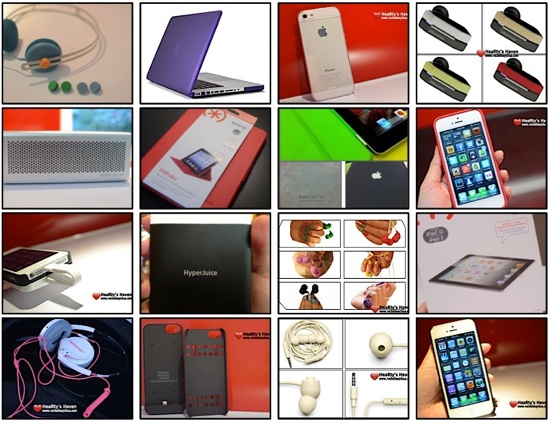
Accessories for your Apple-branded Gadgets

Accessories for your Apple-branded Gadgets

As I clean up the things at my place, I realised that I have several accessories and Apple-branded gadgets.  I’m definitely an Apple fan and I definitely proved it because I tend to buy a lot of their products.  Apart from that, I stay awake every time Apple announces a new product!

With that in mind, I decided to create a working list so that I have an inventory of everything that I have.  I tend to forget things as well so this is a good reminder.  You can consider this as a guide if you’re on a lookout for accessories that will go well with your MacBook, iPhone, iPod Touch and iPad.

SCREEN PROTECTORS & CASES

EARPHONES, HEADPHONES & SPEAKERS

OTHER ACCESSORIES


Updated: February 15, 2014

Roch Signature

Olloclip for iPhone 5 Review

Olloclip for iPhone 5 Review

Gone were the days when I bring my DSLR everyday.  Ever since I got the Olloclip for the iPhone 5, I became confident that my iPhone can produce beautiful pictures that I can finally save the DSLR for special occasions only.

In fact, whenever I install the olloclip on my iPhone 5, I get questions like, “what is that?“, “that’s a cool gadget, how much is it?“, “how cool!  where can I get that accessory?“.

Let me introduce one of my favorite iPhone accessory: the Olloclip.  It’s a 3-in-1 photo lens system for the iPhone that works with any iOS applications.  It costs about Php 2,950 which is very cheap considering that we are getting three different lenses (yes, three!).

Olloclip Photo Lens iPhone

What’s inside the Olloclip box?

Olloclip iPhone Contents

Included in the box are:

  1. a microfiber bag carrying case that doubles as a cleaning cloth
  2. lens caps for both ends of the olloclip
  3. a macro lens
  4. a fisheye lens
  5. a wide-angle lens
  6. iPod touch adapter

What I like about the Olloclip?

  • Apart from iPhone 5, this little accessory works with iPod touch 5th generation.  An adapter is included in the box so that we can use olloclip on the iPod Touch.

Olloclip iPod adapter

  • The olloclip is so easy to bring around.  It’s so small that you can put the accessory in your pocket.
  • The carrying bag doubles as a cleaning cloth!  Yes, the pouch is made of microfiber thus it can be used to wipe any fingerprints or dust on the lenses.

Olloclip Lens iPhone Travel

  • It’s so useful and functional!  Olloclip works as advertised.  It’s a 3-in-1 lens system that works great, more than great!
    • Fish eye – provides a field of view of approximately 180 degrees.  It’s a fun feature and can be addicting!  It gives focus to the subject.  I love how photos come out, so cute!
    • Wide-angle – doubles the native viewing angle of the iPhone!  This lens is perfect for nature and landscape shots.
    • Macro – allows you to focus the phone within 13mm of the photo subject.  I like how we can see the subject better as the macro lens is capable of making 10x close-ups!  The lens is accessible by unscrewing the wide-angle lens from the olloclip.

Olloclip iPhone Lens Functions

  • Olloclip is so simple to use.  You don’t even need to read any manual to understand how it works.  You just snap it on your iPhone and take photos like you usually do on your iPhone 5.
  • The three lenses works for pictures but also for videos!  So awesome!
  • Installing the olloclip is easy.  You just snap the accessory to the corner of the iPhone 5 where the rear camera is, and it aligns the lenses automatically.
  • The Olloclip is made from high quality grade aluminium, precision-ground coated glass optics and hard plastic.  It feels strong, tough and can withstand frequent use of the accessory.
  • The Php 2,950 price is definitely a steal considering that we are getting three different kinds of lenses.  If we buy a macro lens for our DSLR, it’ll cost thrice as much!  What more for all three?

Olloclip iPhone Easy Snap

What I don’t like about the Olloclip?

Olloclip iPhone 5 Cap

There are two things that I didn’t like about olloclip (nothing is perfect after all!):

  • The lens cap do not stay well and tends to come off easily.  It’s a good thing that I put the lens in the carrying bag so I always find it inside.
  • Olloclip only works without an iPhone case.  Thus, if you have an iPhone case, you have to remove it whenever you use olloclip.

My Personal Olloclip Gallery

I took a lot of photos with Olloclip.  I especially love the wide-angle lens because it makes the view bigger.  Group pictures are not a problem anymore if we’re a bit challenged with little space.  I feel like I can produce beautiful pictures using such a nifty little gadget.  I love Olloclip and I highly suggest you get one now!

  • Macro Shots

Olloclip iPhone Watch Macro

Olloclip Macro Insect

  • Wide-angle Shots

olloclip greenbelt wide angle

  • Fisheye Shots

olloclip fish eye

Olloclip iPhone Fish Lens

Roch Signature


Loading...
X